Graph Modeling & Logic Solvers
If you’ve ever tried to secure a complex system, you know the struggle: you draw a diagram on a whiteboard, you think it looks secure, but you missed one hidden path that allows an attacker to bypass the firewall.
Whiteboards are dumb. They don’t know that a “Database” shouldn’t talk directly to the “Internet.”
This is where Model-Driven Engineering (MDE) and Graph Modeling come in. Instead of drawing dumb pictures, we write logic. We treat our architecture as a mathematical graph, allowing us to mathematically prove our design is valid before we write a single line of code.
In this post, I’ll guide you through the basics of Graph Modeling using Refinery, moving from “drawing boxes” to “generating secure architectures automatically.”
1. The Metamodel: Defining the Rules of Engagement
In MDE, we don’t start by drawing. We start by defining the grammar of our world. This is called the Metamodel.
Think of it as the “Legend” on a map. You define what objects can exist and how they are allowed to connect.
Let’s imagine we are building a simple network. We need:
- Services (Web Servers, APIs)
- Datastores (SQL, Redis)
- Firewalls (The gatekeepers)
Here is how we define that in Refinery code:
1
2
3
4
5
6
7
8
9
10
11
12
13
14
15
16
17
18
19
20
// The Container (The Network)
class Network {
    contains Asset[0..*] assets
}

// The Abstract Asset (Generic Hardware)
abstract class Asset {
    Asset[0..*] connectsTo
}

class SensitiveTag {}

// The Concrete Assets
class WebServer extends Asset {}

class Database extends Asset {
    SensitiveTag[0..1] hasSensitivity
}

class Firewall extends Asset {}
What did we just do? We created a rulebook. We said that Assets can connect to other Assets. We haven’t built a specific network yet; we’ve just defined the building blocks.
The current state of the model can be observed here: Refinery
2. The Instance Model: Drawing the Blueprint
Now that we have the rules, we can build a specific scenario. This is called an Instance Model. This is equivalent to drawing the actual diagram for a specific client.
1
2
3
4
5
6
7
8
9
10
11
12
13
14
15
16
17
// Create the Network
Network(myCorpNet).

// Create the Assets
WebServer(publicWeb).
Firewall(edgeFirewall).
Database(usersDB).

// Create the 'PII' Tag
SensitiveTag(PII).

// Mark the DB as sensitive by connecting them
hasSensitivity(usersDB, PII).

// Create the Connections
connectsTo(edgeFirewall, publicWeb).
connectsTo(publicWeb, usersDB).
In a Graph Modeling tool, this text instantly renders as a visual diagram: Firewall -> Web -> DB.
The current state of the model can be observed here: Refinery
The “Closed World” Assumption
Here is the critical security concept. By default, logic solvers operate in an Open World (assuming invisible things might exist). In security, we need a Closed World (if it isn’t on the diagram, it doesn’t exist).
We explicitly tell the solver:
1
2
3
4
5
6
7
8
9
10
11
12
// Do not invent ghost servers
!exists(Network::new).
!exists(WebServer::new).
!exists(SensitiveTag::new).
!exists(Database::new).
!exists(Firewall::new).

// Default: Assume no connections exist unless explicitly drawn
default !assets(*, *).
// Ensures Zero Trust: there shouldn't be a connection between internet and database
default !connectsTo(*, *).
default !hasSensitivity(*, *).
So the model generation code will look like the following:
1
2
3
4
5
6
7
8
9
10
11
12
13
14
15
16
17
18
19
20
21
22
23
24
25
26
27
28
29
30
31
32
33
34
35
36
37
38
39
40
41
42
43
44
45
46
47
48
49
50
51
52
// 1. The Container (The Network)
class Network {
    contains Asset[0..*] assets
}

// 2. The Abstract Asset (Generic Hardware)
abstract class Asset {
    Asset[0..*] connectsTo
}

class SensitiveTag {}

// 3. The Concrete Assets
class WebServer extends Asset {}

class Database extends Asset {
    SensitiveTag[0..1] hasSensitivity
}

class Firewall extends Asset {}

// Do not invent ghost servers
!exists(Network::new).
!exists(WebServer::new).
!exists(SensitiveTag::new).
!exists(Database::new).
!exists(Firewall::new).

// Default: Assume no connections exist unless explicitly drawn
default !assets(*, *).
// Ensures Zero Trust: there shouldn't be a connection between internet and database
default !connectsTo(*, *).
default !hasSensitivity(*, *).

// --- Instance Model (The Blueprint) ---
Network(myCorpNet).
Firewall(edgeFirewall).
WebServer(publicWeb).
Database(usersDB).
SensitiveTag(PII).

// The network "owns" these devices
assets(myCorpNet, edgeFirewall).
assets(myCorpNet, publicWeb).
assets(myCorpNet, usersDB).

// Mark the database as holding sensitive data
hasSensitivity(usersDB, PII).

// Traffic flows from Firewall -> Web -> DB
connectsTo(edgeFirewall, publicWeb).
connectsTo(publicWeb, usersDB).
The current state of the model can be observed here: Refinery
3. Predicates: Visualizing Attack Paths
This is where Graph Modeling beats a whiteboard. We can write queries (Predicates) to find patterns in the graph.
Let’s write a “rule” to detect if a path exists between two nodes.
1
2
3
// A simple recursive logic rule to find a path
pred canReach(x, y) <->
    connectsTo+(x, y).
I added the following test case to test the predicate:
1
pred testFirewallToDB() <-> canReach(edgeFirewall, usersDB).
After that click Generate on the upper right corner of the Refinery tool.
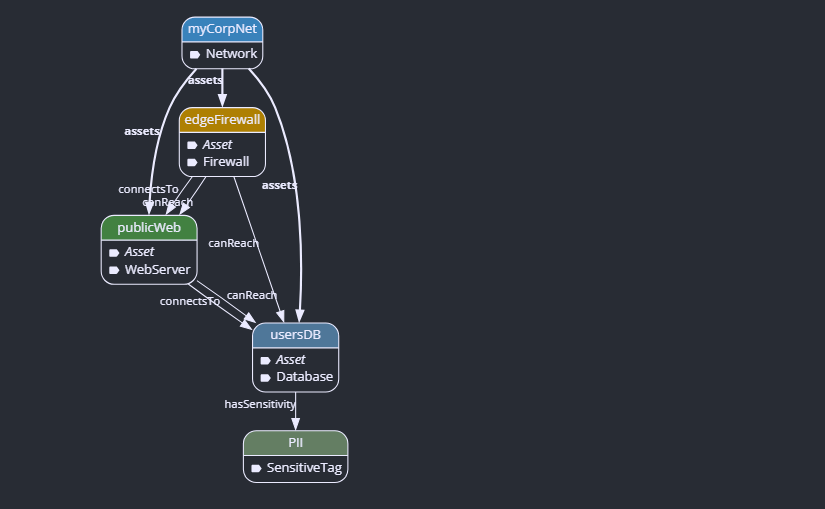
Now, the tool can highlight every single path data takes through your network, even paths you didn’t notice visually.
This image is the perfect proof of Lateral Movement.
- The
connectsToarrows show your intended design (which looks safe because the DB is “hidden” behind the Web Server). - The
canReacharrows show the attacker’s reality (if they breach the Firewall, they have a path to the Database).
You can view the current model here: Refinery
4. Constraints: Banning Bad Architectures
We can define Error Predicates—configurations that are strictly forbidden.
Let’s ban any architecture where the Internet can reach a Database without going through a Firewall.
1
2
3
4
5
6
7
8
9
10
11
12
13
14
15
16
17
18
19
20
21
22
23
24
25
26
27
28
29
30
31
32
33
34
35
36
37
38
39
40
41
42
43
44
45
46
47
48
49
50
51
52
53
54
55
56
57
58
59
60
61
// --- METAMODEL ---
class Network {
    contains Asset[0..*] assets
}

abstract class Asset {
    Asset[0..*] connectsTo
}

class SensitiveTag {}

class WebServer extends Asset {}
class Database extends Asset {
    SensitiveTag[0..1] hasSensitivity
}
class Firewall extends Asset {}

// For simplicity define the Internet as a type of Asset
class Internet extends Asset {}

// --- CLOSED WORLD ASSUMPTIONS ---
!exists(Network::new).
!exists(WebServer::new).
!exists(SensitiveTag::new).
!exists(Database::new).
!exists(Firewall::new).
!exists(Internet::new). // <--- Add this line!

default !assets(*, *).
default !connectsTo(*, *).
default !hasSensitivity(*, *).

// Instance model
// --- INSTANCE MODEL ---
Network(myCorpNet).
Firewall(edgeFirewall).
WebServer(publicWeb).
Database(usersDB).
SensitiveTag(PII).

// NEW: Create the Internet Object
Internet(thePublicInternet).

// Link everything to the Network container
assets(myCorpNet, edgeFirewall).
assets(myCorpNet, publicWeb).
assets(myCorpNet, usersDB).
assets(myCorpNet, thePublicInternet). // <--- Add it to the network map

// Tag the DB
hasSensitivity(usersDB, PII).

// --- WIRES ---
// Normal Traffic: Internet -> Firewall -> Web -> DB
connectsTo(thePublicInternet, edgeFirewall).
connectsTo(edgeFirewall, publicWeb).
connectsTo(publicWeb, usersDB).

// Transitive Logic
pred canReach(x, y) <->
    connectsTo+(x, y).
1
2
3
4
5
6
7
8
// ERROR: A "Leaked" Database
// This error triggers if the Internet can reach a PII-Database
// directly or via a path that bypasses the Firewall.
error pred unsecuredDatabase(db) <->
    Database(db),
    hasSensitivity(db, tag),           // It is sensitive
    canReach(thePublicInternet, db),   // The Internet can get to it
    !canReach(edgeFirewall, db).       // BUT the Firewall cannot reach it (implies bypass)
If you try to model a network that violates this rule, the tool will scream at you. You have effectively “compiled” your security policy.
5. Partial Modeling: The “Auto-Complete” for Architecture
This is the magic trick. Instead of designing the network yourself, you can use Partial Modeling to let the AI solve it for you.
You tell the tool:
“I need 1 WebServer, 1 Database, and 1 Firewall. Make sure the Database is secure.”
1
2
3
4
// The Requirements
scope WebServer = 1.
scope Database = 1.
scope Firewall = 1.
The whole code can be written like the following:
1
2
3
4
5
6
7
8
9
10
11
12
13
14
15
16
class Network { contains Asset[0..*] assets }
abstract class Asset { Asset[0..*] connectsTo }
class Internet extends Asset {}
class Firewall extends Asset {}
class WebServer extends Asset {}
class Database extends Asset {
    SensitiveTag[0..1] hasSensitivity
}
class SensitiveTag {}

scope Network = 1.
scope Internet = 1.
scope Firewall = 1.
scope WebServer = 1.
scope Database = 1.
scope SensitiveTag = 1.
The Refinery tool will use a graph solver to run through thousands of combinations and generate a diagram that satisfies all your connection rules and passes all your security constraints. It automatically places the Firewall in the correct spot to protect the Database.
You can view the current model here: Refinery
6. Summary
Graph Modeling isn’t just about drawing circles and arrows. It is about:
- Structure: Defining a rigid Metamodel (the rules).
- Logic: Using a Closed World assumption (no “magic” objects).
- Verification: Writing Constraints to ban bad designs (loops, leaks, broken flows).
- Automation: Using Partial Modeling to generate valid solutions.