Lab 01: Unprotected Admin Functionality

1. Executive Summary
Vulnerability: Unprotected Admin Functionality (Broken Access Control).
Description: The application relies on “Security by Obscurity” by hiding the administration panel’s URL in robots.txt rather than enforcing server-side session checks.
Impact: Any unauthenticated user who discovers the URL can access administrative functions, leading to full account takeover or data deletion.
2. The Attack
Objective: Access the admin panel and delete the user carlos.
- Reconnaissance: I started by checking standard files for information disclosure. Navigating to
/robots.txtrevealed a sensitive path:
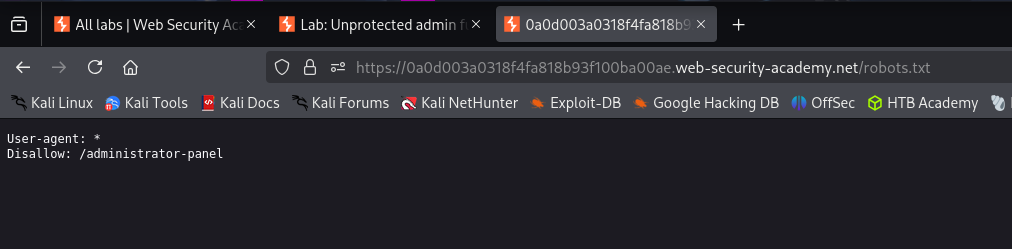
1
2
User-agent: *
Disallow: /administrator-panel
Exploitation: I manually navigated to
https://<LAB-URL>/administrator-panel.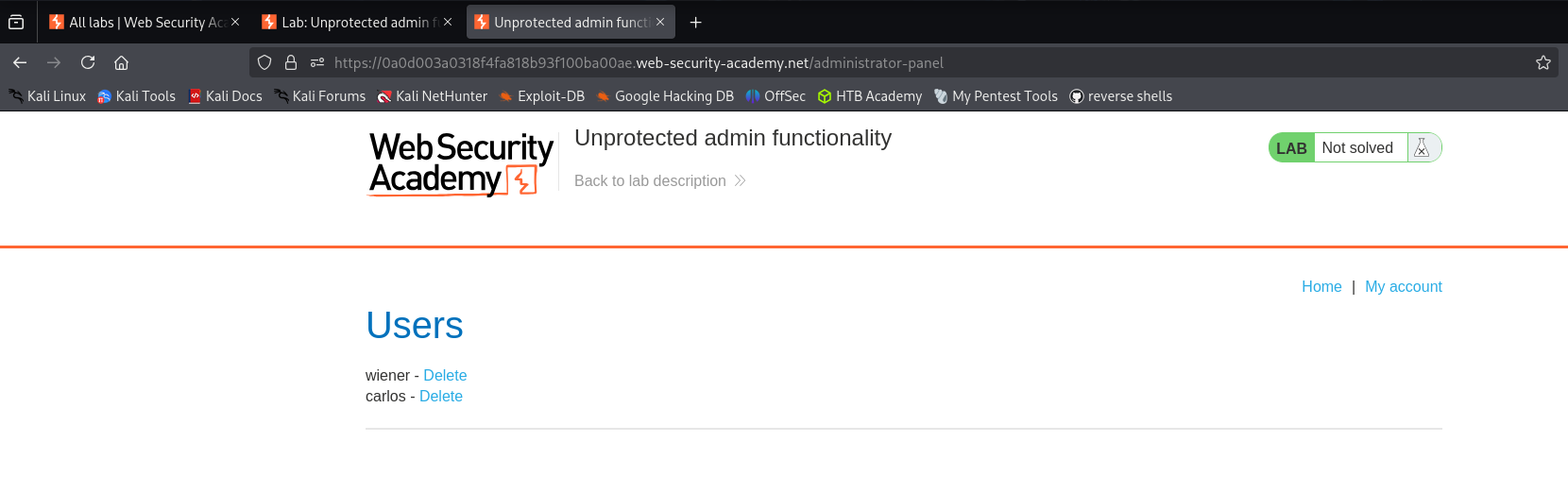
Result: The application did not prompt for login credentials. I successfully accessed the dashboard and clicked “Delete” on user
carlos.
3. Code Review (Vulnerable Code & PR Comment)
Vulnerability Analysis (Explanation): The code below shows a standard Controller in both Java and C#. These controllers are set up to listen for requests at the specific URL (/administrator-panel).
- The Flaw: The developer assumes that because they put the path in
robots.txt(telling Google not to index it), no one will find it. - The Reality: The method is
publicand has zero restrictions. The server accepts the request from any browser, authenticated or not.
Java (Spring Boot)
1
2
3
4
5
6
7
8
9
10
11
12
13
@Controller
public class AdminController {

    // The method listens on "/administrator-panel".
    // It returns the "admin_dashboard" view to whoever asks.
    // There is no "@PreAuthorize" or security check logic here.
    @GetMapping("/administrator-panel")
    public String adminPanel(Model model) {
        List<User> users = userRepository.findAll();
        model.addAttribute("users", users);
        return "admin_dashboard";
    }
}
C# (ASP.NET Core)
1
2
3
4
5
6
7
8
9
10
11
12
public class AdminController : Controller
{
    // The Route attribute maps the URL, but does not secure it.
    // Without an [Authorize] attribute, this endpoint is "Anonymous" by default.
    [HttpGet]
    [Route("administrator-panel")]
    public IActionResult Index()
    {
        var users = _userRepository.GetAll();
        return View(users);
    }
}
Mock PR Comment
The endpoint /administrator-panel is currently accessible to unauthenticated users. Relying on robots.txt to hide this path is “Security by Obscurity” and does not prevent direct access. Please add the standard authorization attributes to this controller method to ensure only users with the Administrator role can access this view.
4. The Fix
Explanation of the Fix: We fix this by enforcing Role-Based Access Control (RBAC). We do not need to change the URL. We simply instruct the framework to check the user’s session before executing the method. If the user does not have the “ADMIN” role, the server will block the request (usually with a 403 Forbidden error).
Java (Spring Boot)
1
2
3
4
5
6
7
8
9
10
11
12
13
@Controller
public class AdminController {

    // SECURE: Spring Security intercepts the request.
    // It verifies the user has the specific authority 'ROLE_ADMIN'.
    @PreAuthorize("hasRole('ADMIN')")
    @GetMapping("/administrator-panel")
    public String adminPanel(Model model) {
        List<User> users = userRepository.findAll();
        model.addAttribute("users", users);
        return "admin_dashboard";
    }
}
C# (ASP.NET Core)
1
2
3
4
5
6
7
8
9
10
11
12
13
// SECURE: The [Authorize] attribute enforces identity checks.
// Only users with the Claim Role="Admin" can pass.
[Authorize(Roles = "Admin")]
public class AdminController : Controller
{
    [HttpGet]
    [Route("administrator-panel")]
    public IActionResult Index()
    {
        var users = _userRepository.GetAll();
        return View(users);
    }
}
5. Automation
A Python script to check for robots.txt leaks and verify if the disallowed paths are actually accessible.
1
2
3
4
5
6
7
8
9
10
11
12
13
14
15
16
17
18
19
20
21
22
23
24
25
26
27
28
29
30
31
32
33
34
35
36
37
38
39
40
41
42
43
44
import requests

def check_robots_exposure(url):
    print(f"[*] Analyzing {url}/robots.txt")

    try:

        robots_url = f"{url}/robots.txt"
        resp = requests.get(robots_url)

        if resp.status_code != 200:
            print("[-] No robots.txt found.")
            return


        paths = []
        for line in resp.text.split('\n'):
            if "Disallow:" in line:
                # Split by ':' and take the second part, stripping whitespace
                path = line.split(":")[1].strip()
                paths.append(path)

        if not paths:
            print("[-] No disallowed paths found.")
            return

        print(f"[*] Found {len(paths)} disallowed paths. Checking accessibility...")
        for path in paths:
            full_path = f"{url}{path}"
            check_resp = requests.get(full_path)

            # 200 OK means we accessed it successfully = VULNERABLE
            if check_resp.status_code == 200:
                print(f"[!!!] VULNERABLE: {path} is accessible (200 OK)!")
            elif check_resp.status_code == 403:
                print(f"[+] SECURE: {path} is forbidden (403).")
            else:
                print(f"[-] {path} returned status {check_resp.status_code}")

    except Exception as e:
        print(f"Error: {e}")

# Usage
# check_robots_exposure("https://YOUR-LAB-ID.web-security-academy.net")